

To create the cluster, perform the following steps on one of the ESKM servers to be clustered:
-
From the ESKM Management Console, click the Device tab
-
In the Device Configuration menu, click Cluster
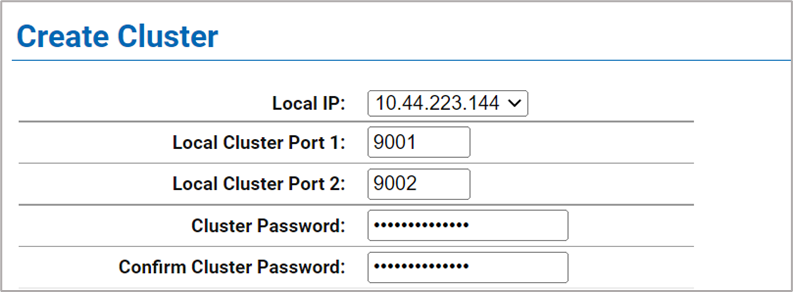
Figure 5: Create Cluster window
-
If required, change the Local IP value. If you have enabled Ethernet#2 you can use its IP address for clustering
All ESKM servers in a cluster must use an IPv4 address for the cluster.
-
If required, change the Local Port value. Utimaco recommends using the default value of 9001
-
Choose a cluster password and enter it into the Cluster Password field. Enter the password a second time into the Confirm Cluster Password field
-
Click the Create button
-
In the Cluster Settings section of the window, click Download Cluster Key and save the key to a convenient location, such as your computer’s desktop
The cluster key is a text file and is only required temporarily. It may be deleted from your computer’s desktop after all ESKM servers have been added to the cluster