

Start the CryptoServer Administration Tool and log in as a user with the permission level of at least 02000000.
If the Key Manager and Crypto User roles are separated, a Key Manager user might need to be created.
More users with the permission level 00000010 might be needed (Group 1) to enforce "m of n" security policy for the key management, and smart card authentication might need to be used.
For this guide, only one Key Manager User will be created.
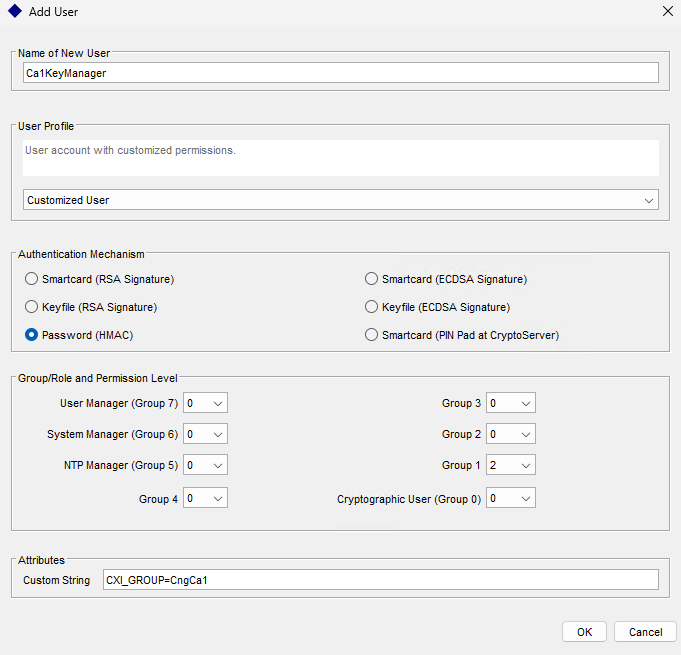
Creating Key Manager User
When a Root CA with Subordinates is created, smart card authentication and the "m of n" rule with permission level of 00000001 need to be used. Because issuing certificates for subordinate CAs is not an automated task, smart card authentication allows a higher level of security to be achieved.
For subordinate CAs, where certificates are issued automatically, the credentials will have to be stored in the .cng configuration file, and Crypto Users with a permission level of 00000002 will have to be created. Use encrypted passwords. For this guide, a user with a permission level of 00000002, CXI Group "CngCa1," and HMAC password will be created.
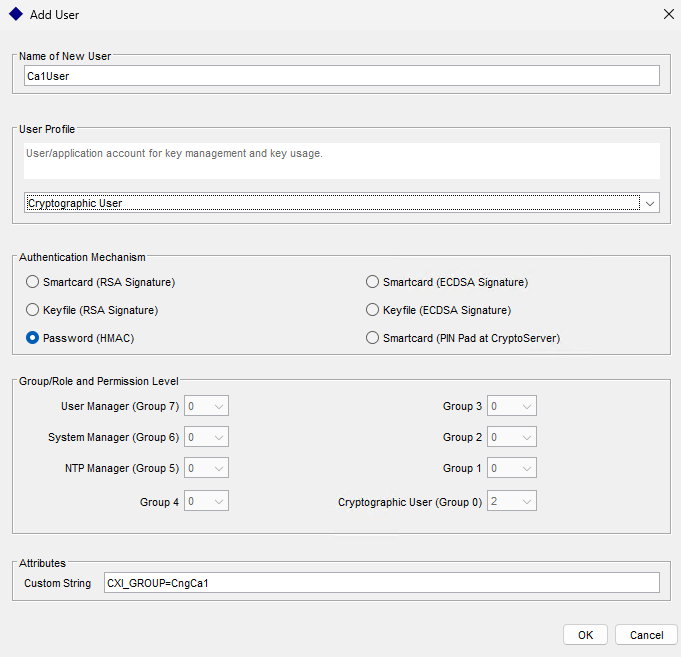
Creating a Crypto User
Based on your requirement, the user can use a password (HMAC), smartcard, or keyfile protection type. If you are using smartcard authentication, the prompt will appear on the PIN Pad device to insert the Smartcard and enter the pin. Then, press the OK button on the PIN Pad.