

In addition to PKCS#11, the PKCS#11 graphical interface tool (P11CAT) and the PKCS#11 command line interface (p11tool2) are installed as well. This chapter shows how to use the P11CAT in order to initialize the PKCS#11 Slot 0. There are 10 active PKCS#11 slots by default. The number of PKCS#11 slots can be modified in the PKCS#11 configuration file.
-
Make sure that the PKCS#11 configuration file contains the IP address of your HSM and that the HSM is running.
-
Open the P11CAT tool on your workstation. When opening the tool for the first time, the slots should be as shown in the Figure 3.
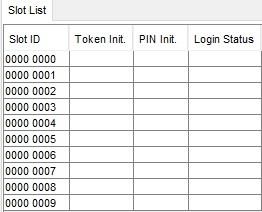
Figure 5: PKCS#11 slots before initialization
-
Select the row 0000 0000 under the Slot ID on the top left-hand side in the Slot List.
-
Click on Login/Logout.
-
Click on Login Generic.
-
Login as a user with the permission mask at least 20000000 (User Manager permission).
-
Click on Slot Management.
-
Create a Security Officer (SO) for Slot 0. Click on Init Token. Write the Token Label. Set the SO PIN. Confirm the SO PIN. Click on Init Token. Observe the changed Token Init. status for the Slot 0.
-
Logout the ADMIN user. Click on Login/Logout. Click on Logout All.
-
Login as the SO. Click on Login/Logout. Click on Login SO. Enter the SO PIN. Click on Login.
-
Click on Slot Management.
-
Create the User for the Slot 0. Select Init PIN. Enter the Normal User PIN. Confirm the Normal User PIN. Click on Init PIN. Observe the changed PIN Init. status for the Slot 0.
-
Logout the SO. Click on Login/Logout. Click on Logout All.
The Slot 0 is now initialized. An application or a user can now connect to the PKCS#11 Slot 0 and create or store objects on the slot. Find further information on creating or deleting objects and users in [CSPKCSM] and [LPKCSHD].