Oracle Key Vault Login

Now that you have the Utimaco HSM PKCS#11 stack configured, you need to connect OKV to the provider.

You will start with initial steps in the OKV web GUI. Then proceed to login via the ssh shell and complete some command line operations.

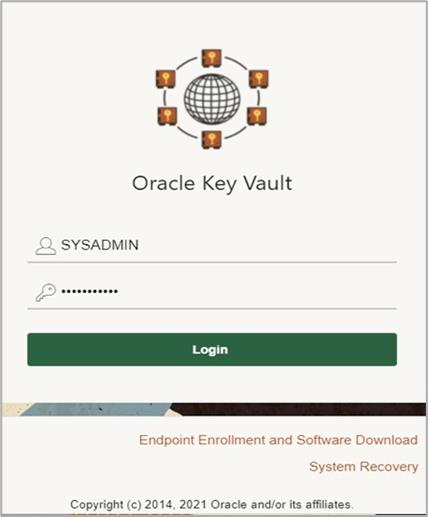
  1. Login as the SYSADMIN user that we defined earlier in the OKV setup.

tmpk0nvtx08.png

OKV Login

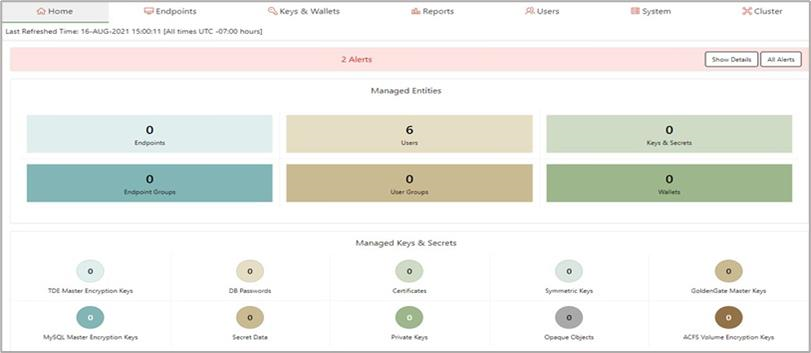
  1. You are now in the Oracle Key Vault Console. You will need to select the System tab at the top right of your browser.

tmptrex_gqn.png

Oracle Key Vault Console

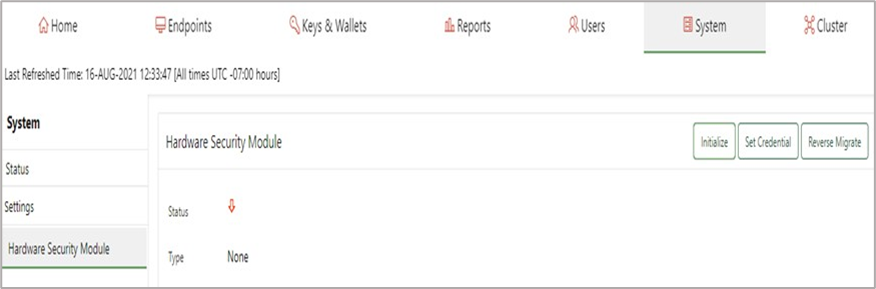
  1. Now we will Initialize and Set Credential for the HSM.

Ensure that you have the PIN value that were set earlier when you configured the PKCS#11 user. In my case I used the PIN “123456".

Confirm that the Utimaco PKCS#11 provider library has been installed in the directory that OKV expects. This is specific to the HSM vendor. In our case /opt/utimaco/lib.

tmpoapmy79i.png

Initialize and set credential for the HSM

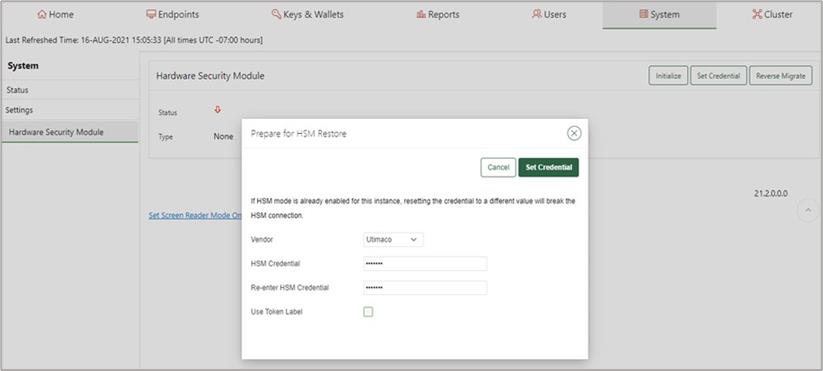
  1. Set the HSM vendor to Utimaco. Then set the PIN value for the PKCS#11 token and then confirm that value in the next field. Ensure that the PIN values match.

tmp8doxx283.png

Set up Utimaco HSM

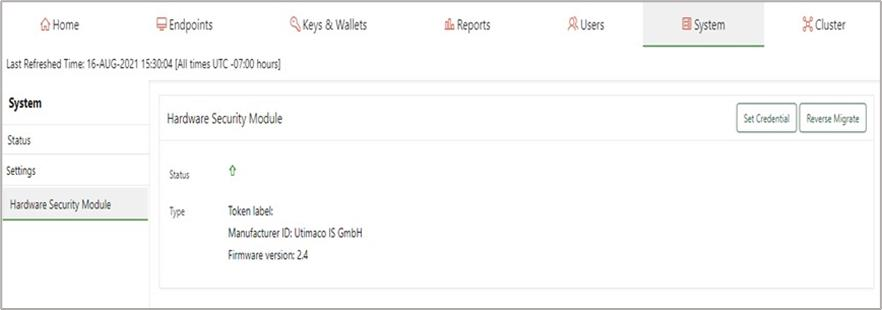
  1. A successful initialization will show the following msg:

Token label:

Manufacturer ID: Utimaco

IS GmbH and the Firmware version: 2.4

You are now ready to set the credentials next.

tmp33sb5_wn.png

Set the credentials

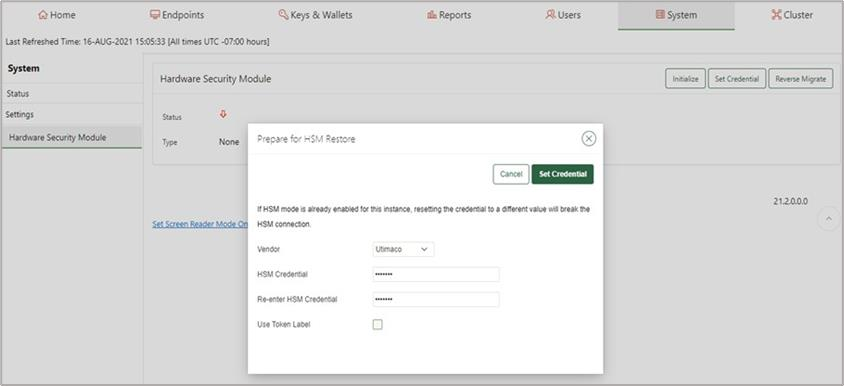
  1. Select the HSM Vendor option and set Utimaco. Then enter the PIN you defined for the Slot 0000 token. Enter it twice. Then select Set Credential button.

tmpr6c9p76p.png

Set PIN for slot

  1. Now you will need to login via ssh to the OKV server and run the following command. Use the ssh RSA key you created when you initialize the OKV instance credentials.


›_ Console

# ssh -i ./ssh-key-date.key support@<OKV server IP> # su -    # /opt/utimaco/bin/p11tool2 GetSlotInfo  

   CK_SLOT_INFO (slot ID: 0x00000000):    slotDescription    

   33303031 4031302e  302e302e 	31363420 	|10.0.0.164 | 

   2d20534c 4f545f30 	30303020 	20202020 	|SLOT0000 | 

   20202020 20202020 	20202020 	20202020  | 	    |    20202020 20202020 	20202020 	20202020 	| 	    |    manufacturerID 

   5574696d 61636f20 	49532047 	6d624820 	|Utimaco Is GmbH| 

   20202020 20202020 	20202020 	20202020 	| 	 	   |   
  1. Using the p11tool2 run the following command. It should show the OKV HSM RoT AES key has been set.

›_ Console

# /opt/utimaco/p11tool2 LoginUser=utimaco ListObjects 

   CKO_DATA: 

   + 1.1 

   CKA_LABEL 	 	 	= OKV 21.2 HSM Key Number 

   + 2.1 

   CKA_KEY_TYPE  	      = CKK_AES 

   CKA_SENSITIVE  	      = CK_TRUE 

   CKA_EXTRACTABLE 	 	= CK_FALSE 

   CKA_LABEL 	 	 	= OKV 21.2 HSM Root Key 

   CKA_ID  	 	      = 0x00000001 () 
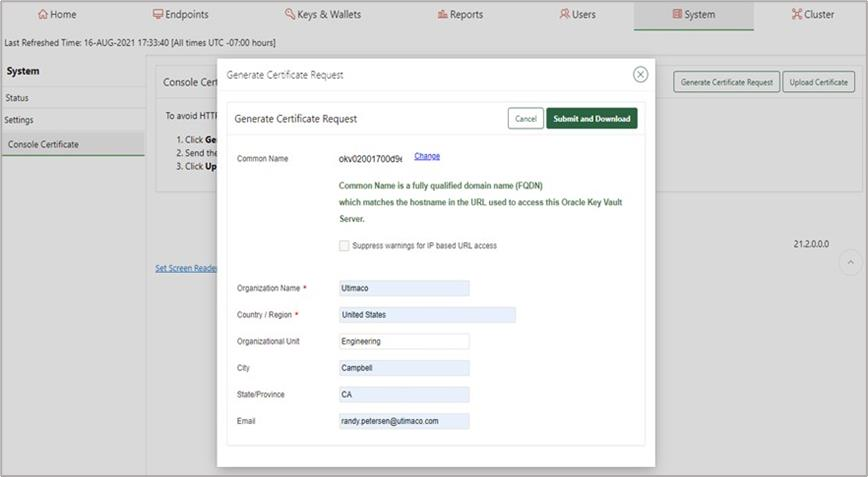
  1. Check out a crypto operation to see that OKV is working. Generate a Certificate Signing Request (CSR).

tmp8j0tmhwi.png

Generate a CSR

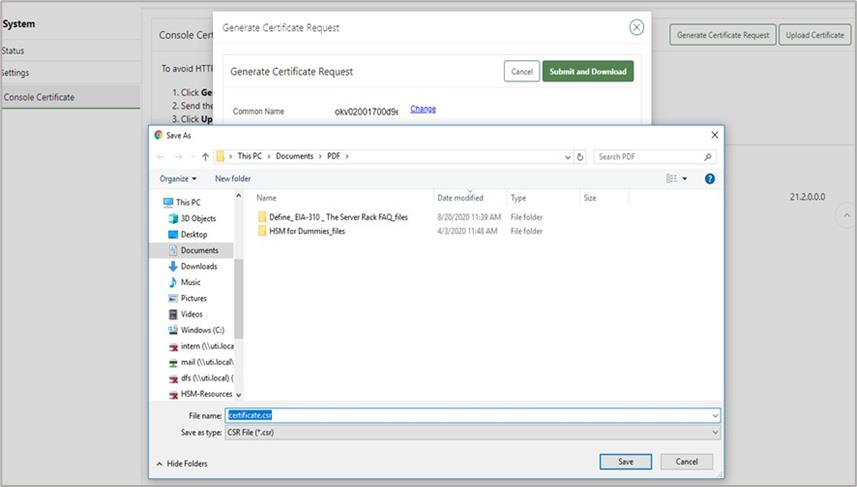
  1. Download the certificate request to your computer.

tmptvrocu0_.png

Download CSR

  1. Display the CSR as generated by OKV

example.file

-----BEGIN CERTIFICATE REQUEST----- 
MIIDHjCCAgYCAQAwgZoxGDAWBgNVBAMMD29rdjAyMDAxNzAwZDllMzEQMA4GA1UE CgwHVXRpbWFjbzEUMBIGA1UECwwLRW5naW5lZXJpbmcxETAPBgNVBAcMCENhbXBi ZWxsMQswCQYDVQQIDAJDQTEpMCcGCSqGSIb3DQEJARYacmFuZHkucGV0ZXJzZW5A dXRpbWFjby5jb20xCzAJBgNVBAYTAlVTMIIBIjANBgkqhkiG9w0BAQEFAAOCAQ8A MIIBCgKCAQEAmzHixXBPlZN9+vRXvGhP0GdfzcBV6XvTTRqU2DSS0/3FVp8xZIZJ j9H1bBmFqbEW7RxlMOIh9/uXk5UEj7P3Aiez+nSmz+Ca2tTbTvf3vzFDUk/OsKvv VlGdpponKLqVlFExpS+bjnBuGlgo9hmQgLruc1GDC57DEyURvnASAmKL+wGqJsdE V1kn70IDlDZZ6A4p4sOLLOgJItsWVzApk2AANc0bLB/+BSiFUKFDxBSyAqpl7NHn QzAgLbThuEJdkoZ9vFt4/VU1+HeA83xp5F207ain1jDtXfvRvNWMHRdFbLJDn6MX zpOLJXUfICE7sxfqFBMwiBcP96okTzNzdwIDAQABoD4wPAYJKoZIhvcNAQkOMS8w LTAJBgNVHRMEAjAAMAsGA1UdDwQEAwIF4DATBgNVHSUEDDAKBggrBgEFBQcDATAN BgkqhkiG9w0BAQsFAAOCAQEALojYxYGsfSw1RjzwXcxGfveyhH4/5aqhVfwqiA7h S8s+W7w1Zwu6Qg2V9NISuS9Y3Ek/BXCMyaylEAm1rYp85anAg+RdalgmH+uza9a1 H5PJjDbNjUwjNS6FCuKNWDqf8sT11Q4CY6ka3oU3VTSq0S4eel7b2Fx1hMh01fXK baS0EfJm7+6f4pLMiuIcrZWSymzBLTP9j//WK3mNynWE0NAXBGfepdhzey3CC31M A5R3bHvVk2heEK0VnzzWtymDkcK5lGV5/KdEcU+Tpn+7xCePrmYmH6pW20GBpVn4 zT/LU4mpmWvG38BBRJuD/58K7iLGXFg1DCchffyJfwd69w== 
-----END CERTIFICATE REQUEST-----:
  1. Use openssl to verify the created CSR and output the PEM format.

example.file

# openssl req -text -noout -verify -in cert.csr > cert.pem
verify OK
Certificate Request:
    Data:
        Version: 0 (0x0)
        Subject: 
            CN=okv02001700d9e3,
            O=Utimaco,
            OU=Engineering,
            L=Campbell,
            ST=CA,
            emailAddress=ruser@utimaco.com,
            C=US

        Subject Public Key Info:
            Public Key Algorithm: rsaEncryption
                Public-Key: (2048 bit)
                Modulus:
                    00:9b:31:e2:c5:70:4f:95:93:7d:fa:f4:57:bc:68:
                    4f:d0:67:5f:cd:c0:55:e9:7b:d3:4d:1a:94:d8:34:
                    92:d3:fd:c5:56:9f:31:64:86:49:8f:d1:f5:6c:19:
                    85:a9:b1:16:ed:1c:65:30:e2:21:f7:fb:97:93:95:
                    04:8f:b3:f7:02:27:b3:fa:74:a6:cf:e0:9a:da:d4:
                    db:4e:f7:f7:bf:31:43:52:4f:ce:b0:ab:ef:56:51:
                    9d:a6:9a:27:28:ba:95:94:51:31:a5:2f:9b:8e:70:
                    6e:1a:58:28:f6:19:90:80:ba:ee:73:51:83:0b:9e:
                    c3:13:25:11:be:70:12:02:62:8b:fb:01:aa:26:c7:
                    44:57:59:27:ef:42:03:94:36:59:e8:0e:29:e2:c3:
                    8b:2c:e8:09:22:db:16:57:30:29:93:60:00:35:cd:
                    1b:2c:1f:fe:05:28:85:50:a1:43:c4:14:b2:02:aa:
                    65:ec:d1:e7:43:30:20:2d:b4:e1:b8:42:5d:92:86:
                    7d:bc:5b:78:fd:55:35:f8:77:80:f3:7c:69:e4:5d:
                    b4:ed:a8:a7:d6:30:ed:5d:fb:d1:bc:d5:8c:1d:17:
                    45:6c:b2:43:9f:a3:17:ce:93:8b:25:75:1f:20:21:
                    3b:b3:17:ea:14:13:30:88:17:0f:f7:aa:24:4f:33:
                    73:77
                Exponent: 65537 (0x10001)

        Attributes:
        Requested Extensions:
            X509v3 Basic Constraints:
                CA:FALSE
            X509v3 Key Usage:
                Digital Signature, Non Repudiation, Key Encipherment
            X509v3 Extended Key Usage:
                TLS Web Server Authentication

    Signature Algorithm: sha256WithRSAEncryption
         2e:88:d8:c5:81:ac:7d:2c:35:46:3c:f0:5d:cc:46:7e:f7:b2:
         84:7e:3f:e5:aa:a1:55:fc:2a:88:0e:e1:4b:cb:3e:5b:bc:35:
         67:0b:ba:42:0d:95:f4:d2:12:b9:2f:58:dc:49:3f:05:70:8c:
         c9:ac:a5:10:09:b5:ad:8a:7c:e5:a9:c0:83:e4:5d:6a:58:26:
         1f:eb:b3:6b:d6:b5:1f:93:c9:8c:36:cd:8d:4c:23:35:2e:85:
         0a:e2:8d:58:3a:9f:f2:c4:f5:d5:0e:02:63:a9:1a:de:85:37:
         55:34:aa:d1:2e:1e:7a:5e:db:d8:5c:75:84:c8:74:d5:f5:ca:
         6d:a4:b4:11:f2:66:ef:ee:9f:e2:92:cc:8a:e2:1c:ad:95:92:
         ca:6c:c1:2d:33:fd:8f:ff:d6:2b:79:8d:ca:75:84:d0:d0:17:
         04:67:de:a5:d8:73:7b:2d:c2:0b:7d:4c:03:94:77:6c:7b:d5:
         93:68:5e:10:ad:15:9f:3c:d6:b7:29:83:91:c2:b9:94:65:79:
         fc:a7:44:71:4f:93:a6:7f:bb:c4:27:8f:ae:66:26:1f:aa:56:
         db:41:81:a5:59:f8:cd:3f:cb:53:89:a9:99:6b:c6:df:c0:41:
         44:9b:83:ff:9f:0a:ee:22:c6:5c:58:35:0c:27:21:7d:fc:89:
         7f:07:7a:f7

OKV has connected to the provider successfully.