

-
Create a wallet directory in the Oracle base path, typically in C:\oracle\admin\<db_unique_name>\wallet.
-
Log in to the database instance as a user granted the SYSDBA administrative privilege.
SQL
SQL> connect / as sysdba
-
Set the WALLET_ROOT parameter.
SQL
SQL> alter system set wallet_root='<path to the oracle wallet directory>' scope=spfile;
-
Shut down and start up the database.
SQL
SQL> shutdown immediate;
SQL> startup;
-
Set the TDE_CONFIGURATION parameter.
SQL
SQL> alter system set TDE_CONFIGURATION="KEYSTORE_CONFIGURATION=HSM" SCOPE=both ;
-
Grant the ADMINISTER KEY MANAGEMENT or SYSKM privilege to SYSTEM and any user you want.
SQL
SQL> grant ADMINISTER KEY MANAGEMENT to system;
SQL> commit;
-
Connect to the database as a system user.
SQL
SQL> connect system/<password>
-
Run the ADMINISTER KEY MANAGEMENT SQL statement to open the HSM-based keystore.
SQL
SQL> ADMINISTER KEY MANAGEMENT SET KEYSTORE OPEN IDENTIFIED BY <hsm_password>;
-
Set the MEK in the HSM keystore.
SQL
SQL> ADMINISTER KEY MANAGEMENT SET KEY IDENTIFIED BY <hsm_password>;
-
You can verify that the key gets generated on the HSM using the following command.
p11tool2 LoginUser=<hsm_password> ListObjects
Example:
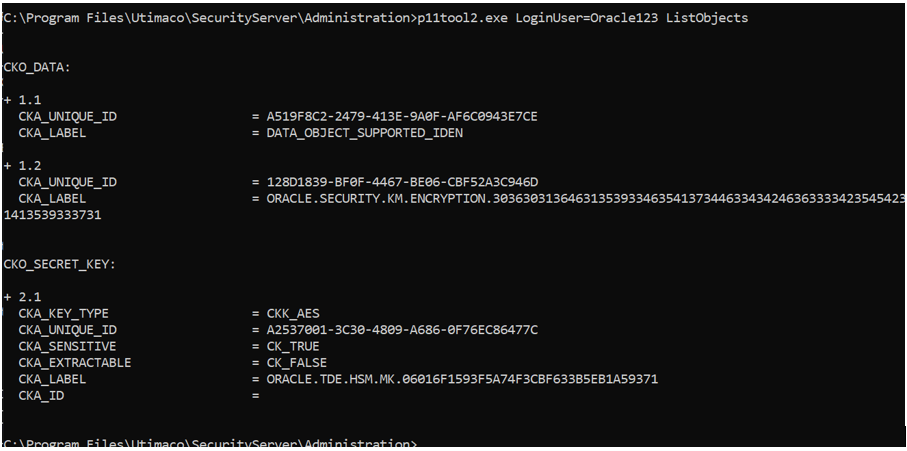
List Objects