

Since binaries are not available under a download link, but rather in the form of NuGet package, make sure your copy of Visual Studio has the NuGet extension. Detailed information on how to install NuGet Client into Visual Studio can be found under this link http://docs.nuget.org/consume/installing-nuget.
After having installed this extension, open the Package Manager Console using the following path within Visual Studio:
TOOLS > NuGet Package Manager > Package Manager Console
In the opened manager console, you should execute the following command:
|
›_ Console |
|---|
|
NuGet retrieves the package from the specified package source and installs it in the project that is selected. Files are copied to the solution, references might be added to the project. In Solution Explorer, you can see references that Visual Studio has added for the installed library, as shown in the following figure.
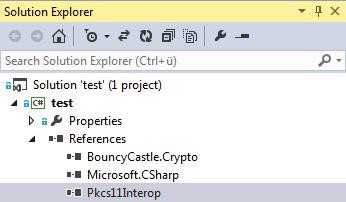
Added references
You can now use the library in your project.