

Sequence diagram
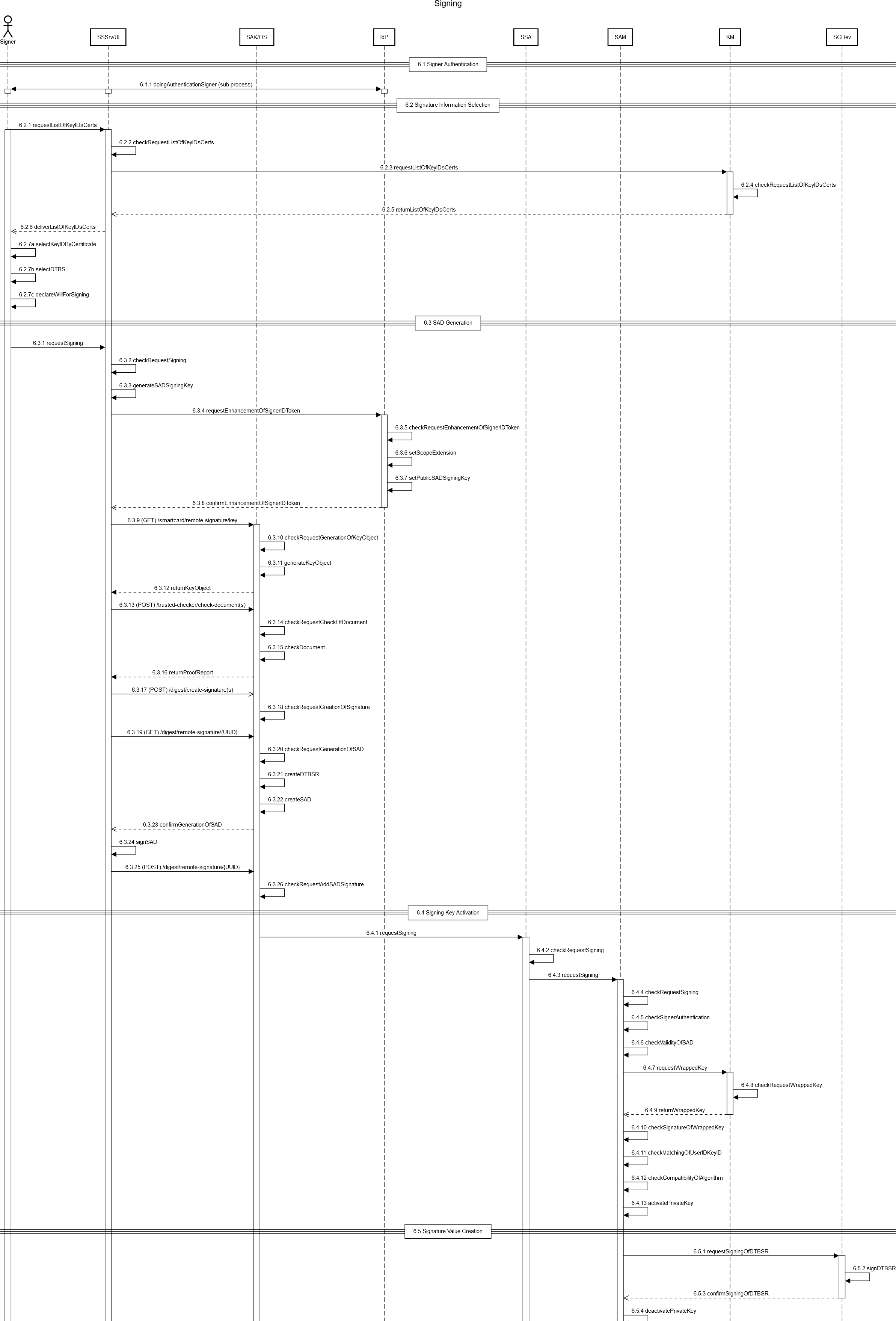
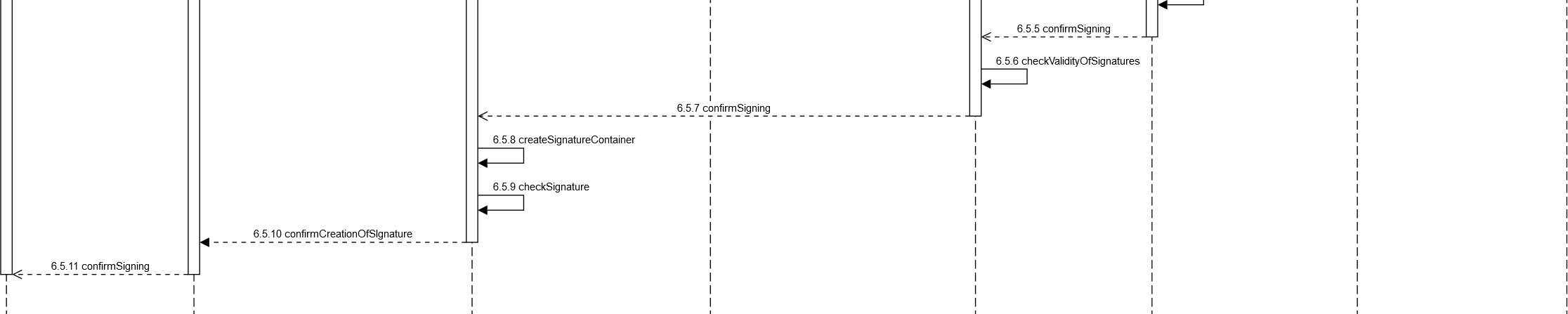
Figure 12: Sequence diagram of the Signing process
Step-by-step description
|
Nr. |
Step |
Components |
Description |
|
6 Signing |
|||
|
6.1 Signer Authentication |
|||
|
6.1.1 |
The Signer performs the authentication process. |
Signer, SSSrv/UI, IdP |
( 61 doingAuthentificationSigner ) Subprocess that authenticates the Signer based on the identification means used. The result is the ID token for the Signer, which signals that authentication has been successfully performed. |
|
6.2 Signature Information Selection |
|||
|
6.2.1 (optional) |
The Signer requests the list of KeyIDs and associated certificates corresponding to the ID token from the SSSrv/UI. |
Signer, SSSrv/UI |
requestListOfKeyIDsCerts |
|
6.2.2 (optional) |
The SSSrv/UI checks the request for the list of KeyIDs and associated certificates. |
SSSrv/UI |
checkRequest ListOfKeyIDsCerts |
|
6.2.3 (optional) |
The SSSrv/UI queries the KM for the KeyID list that matches the specified ID token. |
SSSrv/UI, KM |
requestListOfKeyIDsCerts |
|
6.2.4 (optional) |
The KM checks the request for the list of KeyIDs. |
KM |
checkRequest ListOfKeyIDsCerts |
|
6.2.5 (optional) |
The KM sends the KeyID list with the corresponding certificate information back to the SSSrv/UI. |
KM, SSSrv /UI |
returnListOfKeyIDsCerts |
|
6.2.6 (optional) |
The SSSrv/UI delivers the identified KeyIDs and associated certificates to the Signer. |
SSSrv/UI, Signer |
deliverListOfKeyIDsCerts |
|
6.2.7 |
The Signer selects the certificate and thus the associated KeyID to be used for signing, selects the data to be signed, and makes a declaration of intent to sign. |
Signer |
aselectKeyIDByCertificate selectDTBS declareWillForSigning The declaration of intent is realized via a checkbox. The SHA512 hash of the document and the certificate details of the certificate used for the signature are displayed to the user. |
|
6.3 SAD Generation |
|||
|
6.3.1 |
The undersigned requests the SSSrv/UI to remotely sign data. |
Signer, SSSrv/UI |
requestSigning |
|
6.3.2 |
The SSSrv/UI checks the authorization regarding the request to sign. |
SSSrv/UI |
checkRequestSigning |
|
6.3.3 |
The SSSrv/UI generates the temporary key for the later signature of the SAD as well as the embedding of the public part into the ID token of the Signer. |
SSSrv/UI |
generateSADSigningKey |
|
6.3.4 |
The SSSrv/UI requests the extension of the Signer's ID token. |
SSSrv/UI, IdP |
requestEnhancementOfSignerIDToken |
|
6.3.5 |
The IdP checks the requests for enrichment of the Signer's ID token. |
IdP |
checkRequestEnhancementOfSignerIDToken |
|
6.3.6 |
The IdP extends the ID token by setting the scope extension. |
IdP |
setScopeExtension |
|
6.3.7 |
The IdP extends the ID token by setting the public part of the SAD signature key pair. |
IdP |
setPublicSADSigningKey |
|
6.3.8 |
The IdP confirms the extension of the Signer's ID token and sends the extended ID token to the SSSrv/UI. |
IdP, SSSrv /UI |
confirmEnhancementOfSignerIDToken |
|
6.3.9 |
The SSSrv/UI requests the creation of a Key Object at the SAK/OS. |
SSSrv/UI, SAK/OS |
(GET) /smartcard/remote-signature/key |
|
6.3.10 |
The SAK/OS checks the request to create a Key Object. |
SAK/OS, SAK/OS |
checkRequestGenerationOfKeyObject |
|
6.3.11 |
The SAK/OS generates a Key Object. |
SAK/OS, SAK/OS |
generateKeyObject |
|
6.3.12 |
The SAK/OS responds with the generated Key Object. |
SAK/OS, SSSrv/UI |
returnKeyObject |
|
6.3.13 |
The SSSrv/UI requests review of the document to be signed by the SAK |
SSSrv/UI, SAK/OS |
(POST) /trusted-checker/check-document(s) |
|
6.3.14 |
The SAK/OS will consider the request to review the document to be signed. |
SAK/OS |
checkRequestCheckOfDocument |
|
6.3.15 |
The SAK/OS reviews the document. |
SAK/OS |
checkDocument |
|
6.3.16 |
The SAK/OS responds with the audit report to the SSSrv/UI. |
SAK/OS, SSSrv/UI |
returnProofReport |
|
6.3.17 |
The SSSrv/UI requests the creation of a (remote) signature at the SAK/OS. |
SSSrv/UI, SAK/OS |
(POST) /digest/create-signature(s) |
|
6.3.18 |
The SAK/OS verifies the request to create a (remote) signature. |
SAK/OS |
checkRequestCreationOfSignature |
|
6.3.19 |
The Signer requests the SAK/OS to generate a SAD with the information required for signing. |
SSSrv/UI, SAK/OS |
(GET) /digest/remote-signature/{UUID} |
|
6.3.20 |
The SAK/OS checks the request to generate SAD. |
SAK/OS |
checkRequestGenerationOfSAD |
|
6.3.21 |
The SAK/OS generates a DTBS /R from the DTBS. |
SAK/OS |
createDTBSR |
|
6.3.22 |
The SAK/OS creates the SAD. |
SAK/OS |
createSAD |
|
6.3.23 |
The SAK/OS confirms the generation of the SAD. |
SAK/OS, SSSrv/UI |
confirmGenerationOfSAD |
|
6.3.24 |
The SSSrv/UI signs the SAD. |
SSSrv/UI |
signSAD |
|
6.3.25 |
The SSSrv/UI requests the SAK /OS to add the signature for the SAD to the remote signature process. |
SSSrv/UI, SAK/OS |
(POST) /digest/remote-signature/{UUID} |
|
6.3.26 |
The SAK/OS verifies the request to add the signature for the SAD to the remote signing process. |
SAK/OS |
checkRequestAddSADSignature |
|
6.4 Signing Key Activation |
|||
|
6.4.1 |
The SAK/OS requests the SSA to create a signature by submitting a request to the SSA with the signed SADs. |
SAK/OS, SSA |
requestSigning A remote signature request is sent from the SAK/OS to the SSA. Its format is given by SAP or its specification. The request contains the SAD. |
|
6.4.2 |
The SSA checks the authorization regarding the request to create a signature. |
SSA |
checkRequestSigning |
|
6.4.3 |
The SSA requests the SAM to sign. |
SSA, SAM |
requestSigning |
|
6.4.4 |
The SAM checks the request to create a signature. |
SAM |
checkRequestSigning |
|
6.4.5 |
The SAM checks whether the Signer is authenticated. |
SAM |
checkSignerAuthentication |
|
6.4.6 |
The SAM checks the validity of the declaration of intent to sign. |
SAM |
checkValidityOfSAD |
|
6.4.7 |
The SAM requests the KM to send the wrapped key belonging to the KeyID. |
SAM, KM |
requestWrappedKey |
|
6.4.8 |
The KM checks the request for delivery of the wrapped key. |
KM |
checkRequestWrappedKey |
|
6.4.9 |
The KM responds to the SAM by returning the wrapped key associated with the KeyID. |
KM, SAM |
returnWrappedKey |
|
6.4.10 |
The SAM checks the validity of the signature of the wrapped key. |
SAM |
checkSignatureOfWrappedKey |
|
6.4.11 |
The SAM checks whether: the KeyIDs contained in the SAD and the Wrapped match, and whether. the UserID contained in the Wrapped Key and the ID Token of the SAD match.the KeyID between |
SAM |
checkMatchingOfUserIDKeyID |
|
6.4.12 |
The SAM verifies that the algorithm chosen by the Signer for signature creation is compatible and acceptable for use. |
SAM |
checkCompatibilityOfAlgorithm |
|
6.4.13 |
The SAM activates the private remote signature key. |
SAM |
activatePrivateKey |
|
6.5 Signature Value Creation |
|||
|
6.5.1 |
The SAM requests the SCDev to sign the DTBS/R. |
SAM, SCDev |
requestSigningOfDTBSR |
|
6.5.2 |
The SCDev signs the DTBS/R with the signature key referenced by the KeyID. |
SCDev |
signDTBSR |
|
6.5.3 |
The SCDev confirms the signature of the DTBS/R by returning the signature value to the SAM. |
SCDev, SAM |
confirmSigningOfDTBSR |
|
6.5.4 |
The SAM deactivates the private key. |
SAM |
deactivatePrivateKey |
|
6.5.5 |
The SAM responds to the SSA and confirms the creation of the signature value. |
SAM, SSA |
confirmSigning |
|
6.5.6 |
The SSA checks the validity of the certificate. |
SSA |
checkValidityOfCertificate |
|
6.5.7 |
The SSA responds to the SAK /OS and confirms the creation of the signature value. |
SSA, SAK /OS |
confirmSigning |
|
6.5.8 |
The SAK/OS generates the signature container to represent the signed data. |
SAK/OS |
createSignatureContainer |
|
6.5.9 |
The SAK/OS checks the signed data and the validity of the Signer certificate. |
SAK/OS |
checkSignature |
|
6.5.10 |
The SAK/OS confirms the creation of the (remote) signature to the SSSrv/UI. |
SAK/OS, SSSrv/UI |
confirmCreationOfSignature |
|
6.5.11 |
The SSSrv/UI responds to the Signer by handing over the signed data, thus confirming the remote signing. |
SSSrv/UI, Signer |
confirmSigning |
Table 12: Step-by-step description Signing process