

More and more companies are moving into the cloud; some even apply a “cloud first” strategy. If public clouds such as Amazon Web Services (AWS) are used, data must be protected sufficiently, also to meet legal requirements. Such protection can be achieved with encryption. Necessary encryption keys could be stored in the cloud, for example in the key management systems of the cloud providers. However, in doing so, companies will give up control of their keys, it might be difficult to migrate the keys to another provider, and multi-cloud strategies are impossible.
Hosting your own keys is a viable alternative, especially if you already own an HSM. Then, a VPN tunnel between your cloud installation and the on-premise HSM can be created, and the applications running in the cloud can perform cryptographic operations using the local HSM. Depending on the internet connectivity of your company, higher latency must be considered.
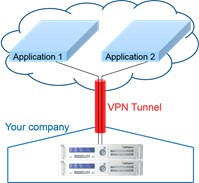
VPN tunnel
In this scenario, you have full control of your HSM, including physical access required e.g., for key ceremonies. Moreover, your in-house applications can also have access to the HSMs. Last but not least, the full feature set of Utimaco CryptoServer HSMs is available, including applications written with CryptoServer SDK or CryptoScript and running on - and thus protected by - the HSM.
This integration guide shows how to set up such a HYOK scenario with AWS. We assume that the reader is familiar with AWS and has already set up a Virtual Private Cloud (VPC). Also, the reader should be familiar with installing the Utimaco SecurityServer software and with using the CryptoServer HSM.