

Within the ESKM Management Console, set up a local CA by following these steps:
-
Go to the Security tab.
-
Click on the Certificates option under Certificates & CAs.
-
Scroll down to the Create Certificate section.
-
Enter a Certificate Authority Name and Common Name.
These may have the same value, such as ESKM Local CA. -
Enter your Organizational information.
-
Select the Algorithm (e.g., RSA-2048).
-
Click on Self-signed Root CA and enter the CA Certification Duration and Maximum User Certificate Duration.
These values determine when the certificate must be renewed and should be set in accordance with your company's security policies. The default value for both is 3650 days or 10 years. -
Click on Create.
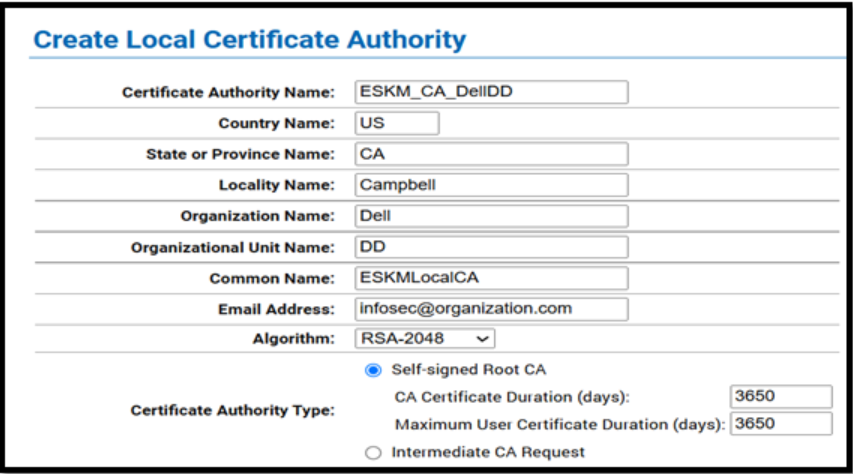
Local CA Creation Page
-
Select the recently created CA Certificate.
-
Click on the Download button to download the CA certificate.
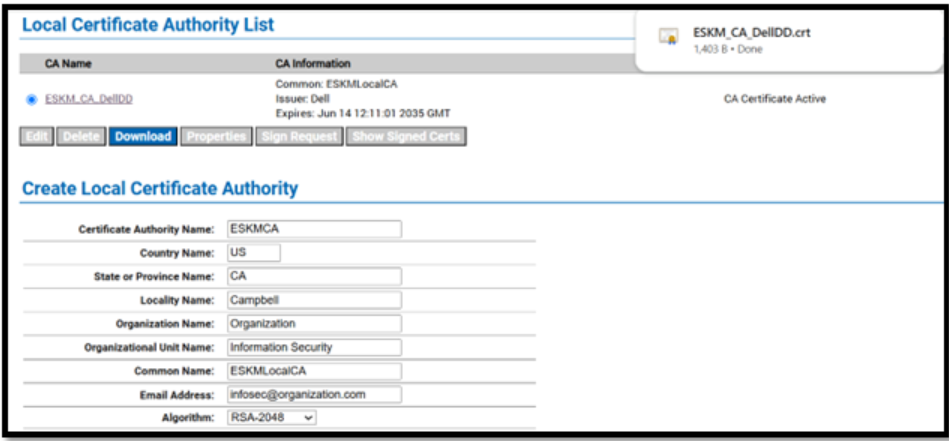
Local CA details