

A Dockerfile contains plain text instructions on how to build a docker image.
-
Create a directory cssim to the appropriate location and change the directory to
cssim.
|
›_ Console |
|---|
|
-
Create a new file Dockerfile to build our simulator image.
|
›_ Console |
|---|
|
-
Copy the following lines into the Dockerfile.
For Redhat UBI Based Docker Image:
|
Dockerfile |
|---|
|
For Debian Based Docker Image:
|
Dockerfile |
|---|
|
Change the SecurityServer Simulator version="4.60.0.0" appropriately.
As you can see from redhat/ubi8:latest that we have derived our image from an official redhat for ubi8 image. Those images are specifically built for containers as they do not contain unnecessary files. Due to the SecurityServer Simulator being an x86 application you need to install some x86 libraries. Similar is the case for Debian image. To connect to the SecurityServer Simulator we will expose a TCP/IP port. The default port 3001 can be changed by supplying a parameter during the build process of our image. The Dockerfile moreover requires the SecurityServer Simulator files to be present in the project directory.
-
Copy the SecurityServer Simulator files from your product CD. They are located in
<cd>/Software/Linux/Simulator. Copy thesim5_linuxfolder to the project folder~/cssim.
|
›_ Console |
|---|
|
-
After this initial setup your project folder should look like this below.
|
›_ Console |
|---|
|
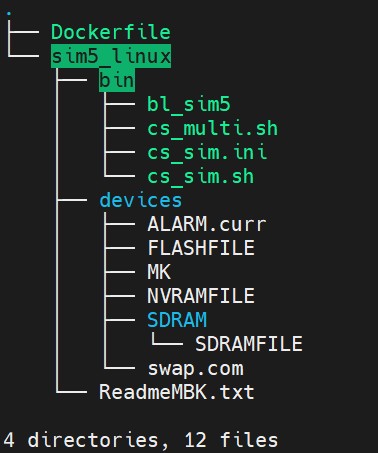
Tree command output