

-
Go to
/etc/hyperledger/fabric-ca-serverdirectory and openfabric-ca-server-config.yamlfile.
|
›_ Console |
|---|
|
-
Locate the bccsp section and add the PKCS #11 settings. For example:
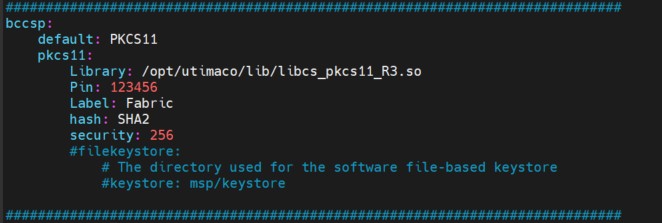
Fabric-CA-Server-config file
Here we need to update 2 port numbers in the file fabric-ca-server-config.yaml.
-
search for 7054 and replace it with 7055
-
search for 9443 and replace it with 9444
-
Delete any keystore in
/etc/hyperledger/fabric-ca-serversuch as the msp directory and theca-cert.pemfile so that new ones are generated with the keys on the HSM when the server is started.