

-
Edit the
fabric-ca-server-config.yamlfile inside the container and change the identity section as needed. -
Start the server if it is not currently running. It must be running for the enroll command to work.
-
Create a directory environment variable.
|
›_ Console |
|---|
|
-
Enroll under the identity in the server YAML file.
|
›_ Console |
|---|
|

Fabric-CA-Client enroll
This command will generate default fabric-ca-client-config.yaml configuration file and msp directory. This configuration file will be used to make HSM related configuration changes in the next step. The client is not yet enrolled through the HSM.
-
Edit the client YAML file in your home directory.
-
Delete the
mspdirectory and edit the YAML file in the home directory. -
Edit the bccsp section and mirror the same configuration from fabric-ca-server
config.yamlfile for BCCSP section for HSM.
|
›_ Console |
|---|
|
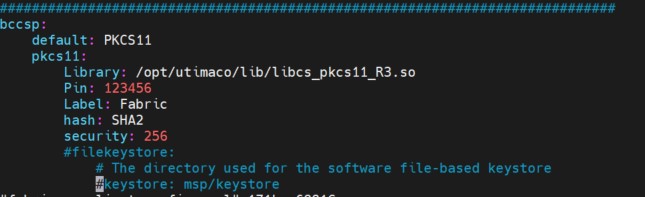
Fabric-CA-Client config file
-
Run the enroll command again with the server identity.
|
›_ Console |
|---|
|

Fabric-CA-Client enroll
-
Register the client. For example.
|
›_ Console |
|---|
|

Register the client
-
Run the enroll command again with the client identity.
|
›_ Console |
|---|
|

Fabric-CA-Client enroll