Installing and Running Bind9

  1. Download the latest version of source code file from BIND 9 - ISC.

  2. Extract the .tar file.

›_ Console

# tar -xvf bind9-9.20.23.tar.gz 
  1. Go to the extracted folder and run the autoreconf command.

›_ Console

# autoreconf -fi 
  1. Install the dependent packages for Bind9 .

›_ Console

# dnf install openssl-devel perl libicu-devel pkgconf userspace-rcu-devel libcap-devel libuv-devel 
  1. Run theconfigure command.

›_ Console

# configure CC="gcc -m64" -enable-threads –disable-doh
  1. Build and install Bind9 as described below:

›_ Console

# make
# make install 

It will install Bind9 on default directory as /usr/local/.

  1. Move the file named.root.key and named.rfc1912.zones to /etc directory.

  2. Check the version of Bind9 as described below.

05_Bind9_version-20260703-122146.png


Bind9 version output

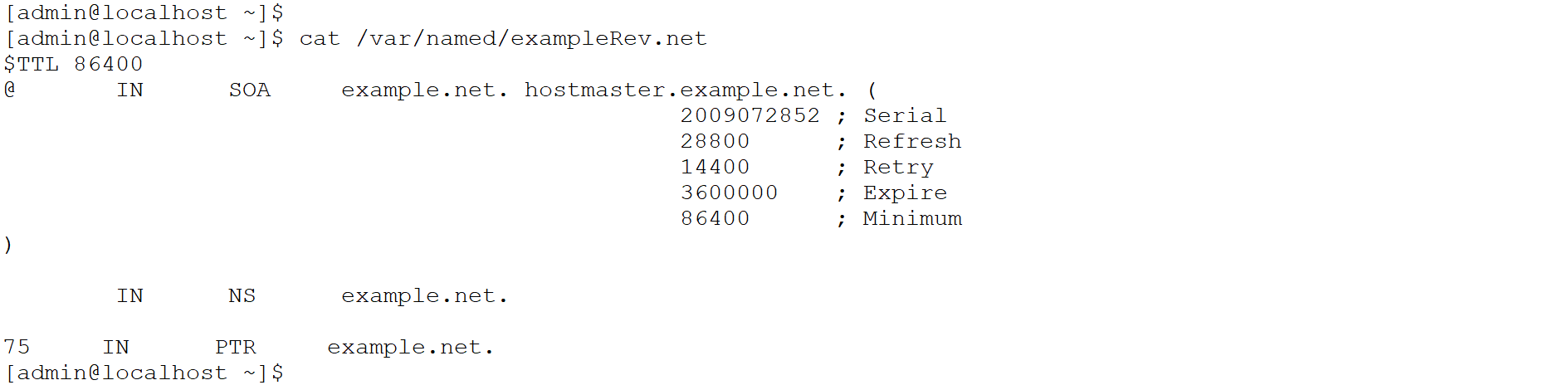
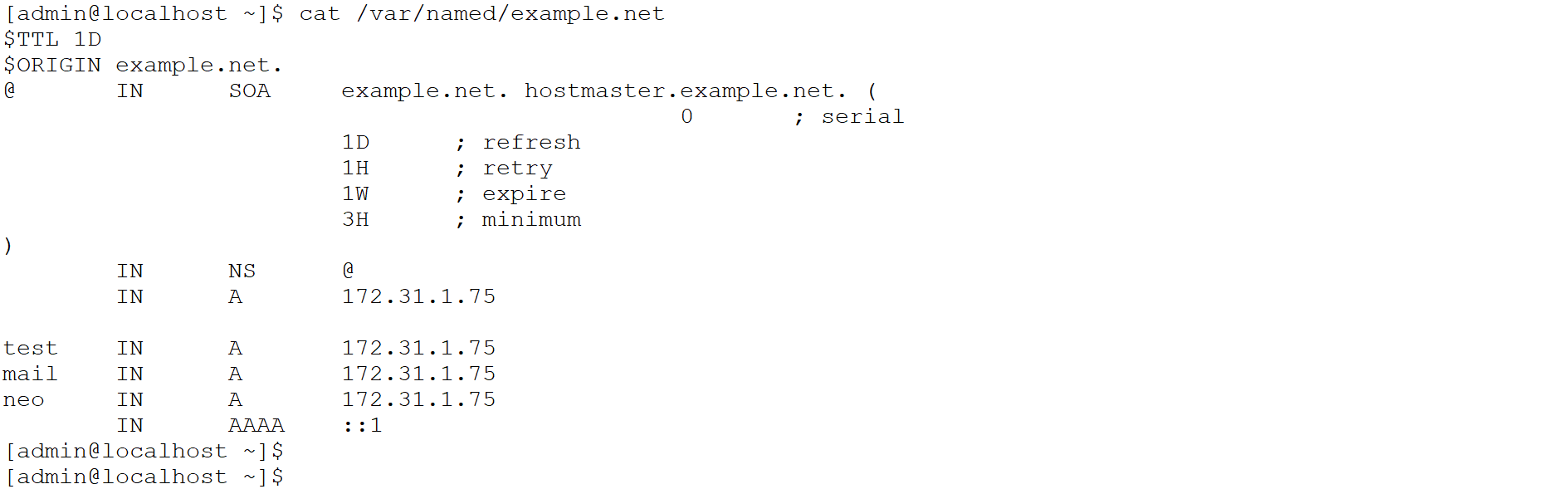
  1. Create a forward and reverse zone file at the /var/named directory.

For example, below are sample files example.net and exampleRev.net for forward and reverse zones respectively.
06_6.2_sample_example.net_file-20260709-001754.png


example.net

06_6.3_sample_exampleRev.net_file-20260709-002010.png


exampleRev.net

  1. Make the appropriate changes in the configuration file of Bind9 that is /usr/local/etc/named.conf related to zone as highlighted. Below is the sample file named.conf.

named.conf

#cat /usr/local/etc/named.conf

options {
    listen-on port 53 {
        127.0.0.1;
        172.31.1.75;
    };

    listen-on-v6 port 53 {
        ::1;
    };

    directory "/var/named";

    dump-file           "/var/named/data/cache_dump.db";
    statistics-file     "/var/named/data/named_stats.txt";
    memstatistics-file  "/var/named/data/named_mem_stats.txt";
    secroots-file       "/var/named/data/named.secroots";
    recursing-file      "/var/named/data/named.recursing";

    allow-query {
        localhost;
    };

    recursion no;
    dnssec-validation no;

    managed-keys-directory "/var/named/dynamic";

    pid-file "/run/named/named.pid";
    session-keyfile "/run/named/session.key";

    include "/etc/crypto-policies/back-ends/bind.config";
};

logging {
    channel default_debug {
        file "data/named.run";
        severity dynamic;
    };
};

zone "." IN {
    type hint;
    file "named.ca";
};

zone "example.net" {
    type primary;
    file "example.net";
};


  1. Start the 'named' service for Bind9 using below command and verify the 'named' process running.

›_ Console

#/usr/local/sbin/named -f -c /usr/local/etc/named.conf
06_6.4_Bind9_running_and_status-20260709-005531.png


Start named service