

This step involves deploying the kms-plugin.yaml file, which creates a Kubernetes DaemonSet to manage the KMS plugin pods across clusters.
-
Create the
kms-plugin.yamlfile in thek8s_plugindirectory.

Create kms-plugin.yaml
-
Paste the following into the yaml file and save it.
apiVersion: apps/v1
kind: DaemonSet
metadata:
  name: kms-plugin-ds
  namespace: kube-system
  labels:
    app: kms-plugin
spec:
  selector:
    matchLabels:
      app: kms-plugin
  template:
    metadata:
      labels:
        app: kms-plugin
    spec:
      nodeSelector:
        node-role.kubernetes.io/control-plane: "" # Or "master": "" depending on your cluster's labels
      tolerations:
        # Tolerate the master/control-plane taint if it exists (common for control plane nodes)
        - key: node-role.kubernetes.io/control-plane
          operator: Exists
          effect: NoSchedule
        - key: node.kubernetes.io/not-ready # Tolerate not-ready nodes during startup
          operator: Exists
          effect: NoExecute
          tolerationSeconds: 300
        - key: node.kubernetes.io/unreachable # Tolerate unreachable nodes
          operator: Exists
          effect: NoExecute
          tolerationSeconds: 300

      hostNetwork: true
      dnsPolicy: ClusterFirstWithHostNet

      containers:
      - name: kms-plugin
        image: k8s-kms-plugin:1.0 #Mention the image name to be run
        securityContext:
          runAsUser: 0
          runAsGroup: 0
          allowPrivilegeEscalation: false
          capabilities:
            drop:
              - ALL
        env:
        - name: PYTHONUNBUFFERED
          value: "1"
        - name: PYTHONPATH
          value: "/app"
        command: ["python", "-u"]
        args: ["kms_plugin/kms_server.py"]

        livenessProbe:
          exec:
            command:
            - /bin/sh
            - -c
            - "ls /var/lib/kmsplugin/kmsplugin-v1.sock && ls /var/lib/kmsplugin/kmsplugin-v2.sock"
          initialDelaySeconds: 10
          periodSeconds: 10
          timeoutSeconds: 5
          failureThreshold: 3
        readinessProbe:
          exec:
            command:
            - /bin/sh
            - -c
            - "ls /var/lib/kmsplugin/kmsplugin-v1.sock && ls /var/lib/kmsplugin/kmsplugin-v2.sock"
          initialDelaySeconds: 5
          periodSeconds: 5
          timeoutSeconds: 3
          failureThreshold: 1
        volumeMounts:
        - name: config-volume
          mountPath: /app/config/plugin-config.yaml
          subPath: plugin-config.yaml
          readOnly: true
        - name: certs-volume
          mountPath: /app/config/certs
          readOnly: true
        - name: logs-volume
          mountPath: /app/logs
        - name: kms-socket-volume
          mountPath: /var/lib/kmsplugin

      volumes:
      - name: config-volume
        configMap:
          name: kms-plugin-config
      - name: certs-volume
        secret:
          secretName: kms-plugin-certs
      - name: logs-volume
        hostPath:
          path: /home/admin/k8s_plugin/logs
      - name: kms-socket-volume
        hostPath:
          path: /var/lib/kmsplugin
          type: DirectoryOrCreate
-
Apply the
kms-plugin.yamlfile.

Apply kms-plugin.yaml
-
Verify that
daemonsetwas applied successfully.

Verify daemonset
-
Verify that the
kms-pluginis running.
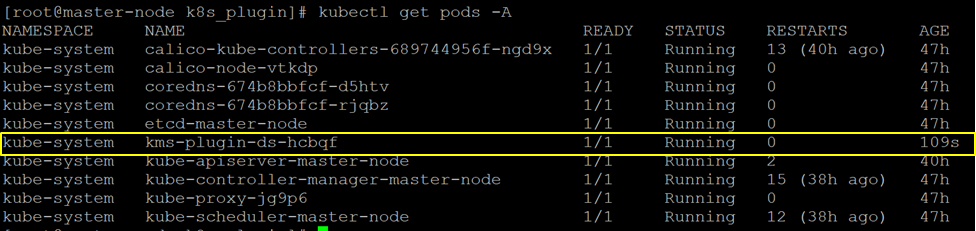
Verify kms-plugin Pod
-
Verify that the
kms-pluginis loging successfully.
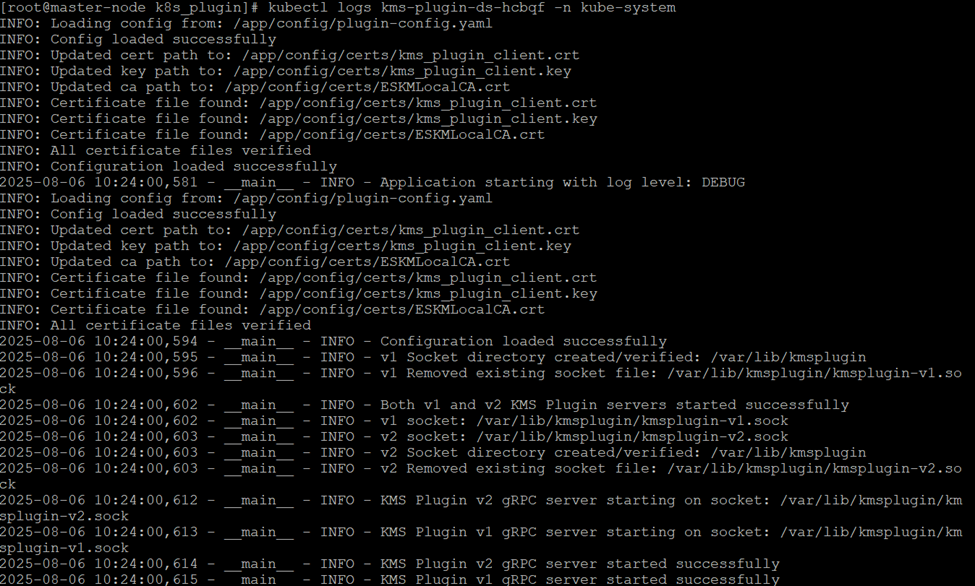
Verify kms-pod Logs