

Create a static pod manifest on the control plane for the KMS plugin. The KMS plugin will be deployed as a static pod.
The yaml file ‘kms-plugin.yaml’ needs to be created in the path '/etc/kubernetes/manifests', so that the yaml file will be automatically managed by the kubelet.
The kubelet running on the control plane node monitors the directory '/etc/kubernetes/manifests'. If a yaml file in this directory is modified, then the kubelet will automatically update the corresponding pod.
Prepare the 'kms-plugin.yaml' file using the below code snippet:
YAML
apiVersion: v1
kind: Pod
metadata:
  name: kms-plugin-v2
  namespace: kube-system
spec:
  hostNetwork: true
  containers:
    - name: kms-plugin
      image: k8s-kms-plugin-v2:v1.0
      imagePullPolicy: IfNotPresent
      command: ["/app/kms_server"]
      env:
        - name: CS_PKCS11_R3_CFG
          value: /app/cs_pkcs11_R3.cfg
        - name: PKCS_LIBRARY_PATH
          value: /app/lib/libcs_pkcs11_R3.so
        - name: LD_LIBRARY_PATH
          value: /app/lib/
      volumeMounts:
        - name: config-volume
          mountPath: /app/cs_pkcs11_R3.cfg
          subPath: cs_pkcs11_R3.cfg
        - name: socket-dir
          mountPath: /var/lib/kmsplugin
        - name: kms-plugin-log
          mountPath: /tmp/k8s/KMSplugin.log
          subPath: KMSplugin.log
        - name: kms-plugin-log
          mountPath: /tmp/k8s/cs_pkcs11_R3.log
          subPath: cs_pkcs11_R3.log
        - name: lib-volume
          mountPath: /app/lib/libcs_pkcs11_R3.so
          subPath: libcs_pkcs11_R3.so
  volumes:
    - name: config-volume
      hostPath:
        path: /etc/kms/config
        type: Directory
    - name: socket-dir
      hostPath:
        path:  /var/lib/kmsplugin
        type: DirectoryOrCreate
    - name: kms-plugin-log
      hostPath:
        path: /etc/kms/log/
        type: Directory
    - name: lib-volume
      hostPath:
        path: /etc/kms/lib/
        type: Directory
Verify the KMS plugin is running using the command:
# kubectl get pods -A
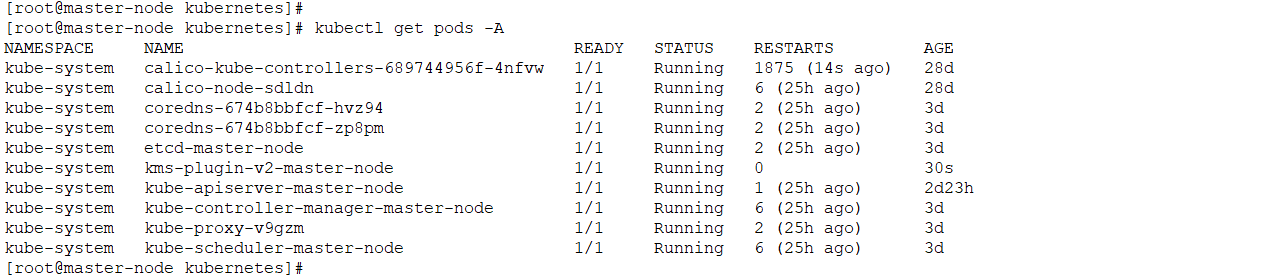
KMS plugin pod status
p11tool2 can be used for verifying the generated key in the HSM.