

The script file kms_plugin_env_setup.sh can be used for setting up the necessary directories and file structures for KMS plugin.
-
Prepare a
kms_plugin_env_stup.shscript file for setting up the environment for the KMS plugin in the K8s control plane environment with the code snippet below.
#!/bin/bash

# Run the script as root
set -e

SOCKET_DIR="/var/lib/kmsplugin"
SOCKET_FILE="$SOCKET_DIR/kmsplugin.sock"
KMS_CONFIG_DIR="/etc/kms/config"
KMS_LIB_DIR="/etc/kms/lib"
KMS_LOG_DIR="/etc/kms/log"
KMS_LOG_FILE="$KMS_LOG_DIR/KMSplugin.log"
PKCS11_LOG_FILE="$KMS_LOG_DIR/cs_pkcs11_R3.log"

#Check for SOCKET_DIR
if [ ! -d "$SOCKET_DIR" ]; then
    echo "Creating directory $SOCKET_DIR"
    mkdir -p "$SOCKET_DIR"
fi

#Remove old socket if exist
if [ -S $SOCKET_FILE ]; then
    echo "Removing old socket file $SOCKET_FILE"
    rm -f "$SOCKET_FILE"
fi

#Create a Unix domin socket file
echo "Creating a Unix socket file $SOCKET_FILE"
nc -lU $SOCKET_FILE &

#Including delay for socket file creation
sleep 1
SOCPID=$!

#Update the permission of the socket file
chmod 666 "$SOCKET_FILE"

echo "Socket created. PID of socat: $SOCPID"

#Check for KMS_CONFIG_DIR
if [ ! -d "$KMS_CONFIG_DIR" ]; then
    echo "Creating directory $KMS_CONFIG_DIR"
    mkdir -p "$KMS_CONFIG_DIR"
fi

#Check for KMS_LIB_DIR
if [ ! -d "$KMS_LIB_DIR" ]; then
    echo "Creating directory $KMS_LIB_DIR"
    mkdir -p "$KMS_LIB_DIR"
fi

#Check for KMS_LOG_DIR
if [ ! -d "$KMS_LOG_DIR" ]; then
    echo "Creating directory $KMS_LOG_DIR"
    mkdir -p "$KMS_LOG_DIR"
fi

#Create the log files
echo "Creating log files"
touch "$KMS_LOG_FILE"
touch "$PKCS11_LOG_FILE"
-
Provide execution permission to the script file
kms_plugin_env_stup.sh.
chmod 755 will set the permission to read, write, and execute to the owner and read and execute to other users.
# chmod 755 kms_plugin_env_stup.sh
-
Execute the script file.
# ./kms_plugin_env_stup.sh

Script execution
Once the script execution is complete, the following file structures will be created.
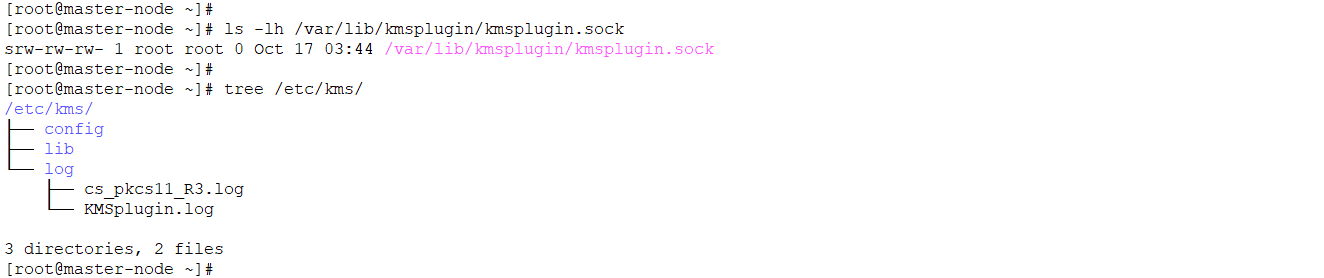
Created file structures from the script
-
Copy the PKCS #11 API config file.
Copy the PKCS #11 API config file 'cs_pkcs11_R3.cfg' to the path '/etc/kms/config'.
-
Copy the PKCS #11 shared library.
Copy the PKCS #11 shared library 'libcs_pkcs11_R3.so' to the path '/etc/kms/lib'.