

The KMIP server provides the interface to clients that use the KMIP protocol. Transport Layer Security (TLS) is required, therefore you must specify the name of the server certificate.
To configure the KMIP server, perform the following steps:
-
Select the Device tab.
-
In the Device Configuration menu, click KMIP Server to display the KMIP Server Configuration window.
-
In the KMIP Server Settings section, click Edit.
-
Configure the KMIP Server Settings. Utimaco recommends the default values of 5696 for the Port and 3600 for the Connection Timeout. If necessary, change the Port and Connection Timeout values. For Server Certificate, select the name of the certificate you created in Setting up ESKM certificate.
If your ESKM server is operating in FIPS-compliant mode, you must specify a KMIP server certificate that meets FIPS requirements.
If your ESKM servers are in a cluster and you are selecting a new KMIP server certificate from the “Server Certificate:” field, you must make sure that all of the ESKM servers in the cluster already have a KMIP server certificate installed with this same name.
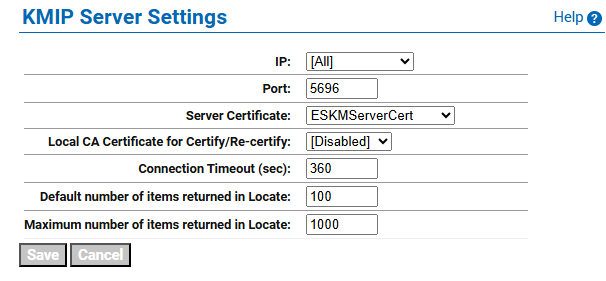
KMIP Server Settings
-
Click Save.
Changing the KMIP server setting causes the KMIP server to restart.