

The following figure shows an overview of the process of managing a Signer through the SAM service.
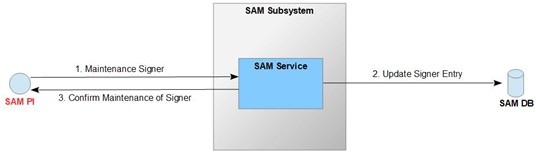
Figure 18: Overview of the Signer_Maintenance operation flow
A Privileged User or Signer uses the SAM peer interface to request the operation. Authentication and identification of the requesting user is required beforehand.
When the request is retrieved, the SAM service verifies that the requestor is authenticated and identified (based on the processes and configuration shown above).
If the authenticity and identity check is successful, the SAM service maintains a Signer's user record based on the data it received with the request. More specifically, the SAM service updates a Signer's authentication data in the form of assigned certificates in the SAM DB. Otherwise, an error is returned.
|
Purpose |
This operation is invoked by the requestor to update a user's credential validation data (the IdP certificate). |
||
|
Interface |
SAM Peer Interface (see [IF_SPI]) |
||
|
Method of use |
The operation is called by client software according to the SAM peer interface specification (see [IF_SPI]). |
||
|
Inputs |
Parameter |
Typ |
Description |
|
userid |
String |
UserID of the user to be changed |
|
|
|
certificates |
Binary[] |
Certificates of the IdP authorized to sign Identity Tokens for this user (multiple certificates are allowed to enable certificate rollover) |
|
Output |
Parameter |
Typ |
Description |
|
|
void |
A result without errors indicates a positive operation. |
|
|
Error Messages |
Typ |
Reason |
|
|
ContainerParseError |
If the input cannot be parsed into a message container |
||
|
MessageParseError |
If the input data cannot be parsed into the specified message type |
||
|
UnknownMessageType |
The contained message type was not known to the processor |
||
|
UnknownCredentialType |
The credential type included was not known to the processor |
||
|
AuthenticationError |
The credential could not be validated |
||
|
UnknownUser |
The credential could not be associated with a user |
||
|
NotAuthorized |
If the acting user is not authorized to perform the current operation When a regular user specifies the UserID of another user |
||
|
NotOperational |
A component (e.g. , HSM) is not available or not in an operational state |
||
|
UnexpectedError |
When an error condition occurs that was not anticipated |
||
|
InvalidInput |
When the set of certificates is empty If the certificate set does not contain the currently used certificate in case of self modification |
||
|
Security Audit Log Entry |
In case of success An audit record is created that contains at least the following information |
|
|
|
|
|
In case of an error |
|
|
The following errors output regular log messages, but no audit log entries (since no acting user could be inferred): |
|
|
|
|
|
Otherwise |
|
|
An audit record is created containing at least the following information |
|
|
|
Table 19: Description of the Signer_Maintenance operation