Creating Smartcard Certificate Profile for Certificate that Client Can Request

  1. Log in to CMS web as tenant administrator.

  2. Navigate to Certificate Profile Management.

  3. Create a Smartcard certificate profile so that clients can request a smartcard logon certificate. You can also download the existing certificate profile from CMS Web for example TLS profile and edit with smartcard entries as shown below:

ScardUPN.xml

# <?xml version="1.0" encoding="UTF-8" standalone="yes"?>  
<X509Profile xmlns="http://exceet-secure-solutions.de/xml/ns/pki/profile/v1">  
 <appInfo>  
 <myDescriptor>  
 <project>example-pki</project>  
 <category>End Entity Certificate</category>  
 <title>smartcard Certificates</title>  
 <details>C.smartcard.TLS</details>  
 </myDescriptor>  
 </appInfo>  
 <!-- for a End-Entity Certificate, it must be false -->  
 <ca>false</ca>  
 <!-- the validity of certificate in days -->  
 <validity>1826</validity> <!-- 5 Jahre -->  
 <!-- either current to use the current time or midnight to use the next   
mid-night time -->  
 <notBeforeTime>current</notBeforeTime>  
 <!-- whether a new certificate with duplicated key is permitted -->  
 <duplicateKey>false</duplicateKey>  
 <!-- whether a new certificate with duplicated subject is permitted -->  
 <duplicateSubject>true</duplicateSubject>  
 <!-- whether the request can contain the subject attribute serialNumber --  
>  
 <serialNumberInReq>true</serialNumberInReq>  
 <!-- permitted public keys. If absent, then all public keys are permitted   
-->  
 <keyAlgorithms>  
 <algorithm>  
 <algorithm description="RSA">1.2.840.113549.1.1.1</algorithm>  
 <parameters>  
 <RSAParameters>  
 <modulusLength>
 048" max="2048"/>  
<range min="3072" max="3072"/>  
<range min="4096" max="4096"/>  
 </modulusLength>  
 </RSAParameters>  
 </parameters>  
 </algorithm>  
 <algorithm>  
 <algorithm description="EC">1.2.840.10045.2.1</algorithm>  
 <parameters>  
 <ECParameters>  
 <curves>  
 <curve   
description="prime256v1">1.2.840.10045.3.1.7</curve>  
 <curve description="secp384r1">1.3.132.0.34</curve>  
<curve description="secp521r1">1.3.132.0.35</curve>  
<curve   
description="brainpoolp256r1">1.3.36.3.3.2.8.1.1.7</curve>  
 <curve   
description="brainpoolp384r1">1.3.36.3.3.2.8.1.1.11</curve>  
 <curve   
description="brainpoolp512r1">1.3.36.3.3.2.8.1.1.13</curve>  
 </curves>  
 <pointEncodings>  
 <pointEncoding>4</pointEncoding>  
 </pointEncodings>  
 </ECParameters>  
 </parameters>  
 </algorithm>  
 </keyAlgorithms>  
 <subject>  
 <dnBackwards>false</dnBackwards>  
 <incSerialNumber>false</incSerialNumber>  
<rdn minOccurs="0" maxOccurs="1">  
 <type description="emailAddress">1.2.840.113549.1.9.1</type>  
 <minLen>1</minLen>  
 <maxLen>255</maxLen>  
 <regex>^\S+@\S+$</regex>  
 </rdn>  
 <rdn minOccurs="0" maxOccurs="1">  
 <type description="uid">0.9.2342.19200300.100.1.1</type>  
 <minLen>0</minLen>
 Len>255</maxLen>  
 <regex>^\S+@\S+$</regex>  
 </rdn>  
 <rdn minOccurs="1" maxOccurs="1">  
 <type description="cn">2.5.4.3</type>  
 <minLen>1</minLen>  
 <maxLen>64</maxLen>  
 </rdn>  
 <rdn minOccurs="0" maxOccurs="1">  
 <type description="serialNumber">2.5.4.5</type>  
 <minLen>1</minLen>  
 <maxLen>64</maxLen>  
 <regex>[-'()=+,.:?/ a-zA-Z0-9]*</regex>  
 </rdn>  
 <rdn minOccurs="0" maxOccurs="9">  
 <type description="ou">2.5.4.11</type>  
 <minLen>1</minLen>  
 <maxLen>64</maxLen>  
 </rdn>  
 <rdn minOccurs="0" maxOccurs="1">  
 <type description="o">2.5.4.10</type>  
 <minLen>1</minLen>  
 <maxLen>64</maxLen>  
 </rdn>  
 <rdn minOccurs="0" maxOccurs="1">  
 <type description="l">2.5.4.7</type>  
 <minLen>1</minLen>  
 <maxLen>128</maxLen>  
 </rdn>  
 <rdn minOccurs="0" maxOccurs="1">  
 <type description="st">2.5.4.8</type>  
 <minLen>1</minLen>  
 <maxLen>128</maxLen>  
 </rdn>  
 <rdn minOccurs="0" maxOccurs="1">  
 <type description="c">2.5.4.6</type>  
 <minLen>1</minLen>  
 <maxLen>2</maxLen>  
 </rdn>  
 </subject>  
 <extensions>
 sion required="true" permittedInRequest="false">  
 <type description="subjectKeyIdentifier">2.5.29.14</type>  
 <critical>false</critical>  
 </extension>  
 <extension required="true" permittedInRequest="false">  
 <type description="authorityKeyIdentifier">2.5.29.35</type>  
 <critical>false</critical>  
 <value>  
 <authorityKeyIdentifier>  
 <includeIssuerAndSerial>true</includeIssuerAndSerial>  
 </authorityKeyIdentifier>  
 </value>  
 </extension>  
 <extension required="true" permittedInRequest="false">  
 <type description="keyUsage">2.5.29.15</type>  
 <critical>true</critical>  
 <value>  
 <keyUsage>  
 <!-- valid values are digitalSignature, contentCommitment,   
keyEncipherment, dataEncipherment,  
 keyAgreement, keyCertSign, cRLSign, encipherOnly,   
decipherOnly -->  
 <usage required="true">digitalSignature</usage>  
 <usage required="true">keyEncipherment</usage>  
 <usage required="true">keyAgreement</usage>  
 </keyUsage>  
 </value>  
 </extension>  
 <extension required="false" permittedInRequest="true">  
 <type description="subjectAltNames">2.5.29.17</type>  
 <critical>false</critical>  
 <!--  
 <value>  
 <subjectAltName>  
 <rfc822Name/>  
 </subjectAltName>  
 </value>  
 -->  
 </extension>
 sion required="true" permittedInRequest="false">  
 <type description="basicConstraints">2.5.29.19</type>  
 <critical>true</critical>  
 <value>  
 <basicConstraints>  
 <pathLen>0</pathLen>  
 </basicConstraints>  
 </value>  
 </extension>  
 <extension required="false" permittedInRequest="false">  
 <type description="certificatePolicies">2.5.29.32</type>  
 <critical>false</critical>  
 </extension>  
 <extension required="false" permittedInRequest="false">  
 <type description="cRLDistributionPoints">2.5.29.31</type>  
 <critical>false</critical>  
 </extension>  
 <extension required="false" permittedInRequest="false">  
 <type description="authorityInfoAccess">1.3.6.1.5.5.7.1.1</type>  
 <critical>false</critical>  
 </extension>  
 <extension required="true" permittedInRequest="false">  
 <type description="extendedKeyUsage">2.5.29.37</type>  
 <critical>false</critical>  
 <value>  
 <extendedKeyUsage>  
 <usage required="true" description="ip-kp
smartCard">1.3.6.1.4.1.311.20.2.2</usage>  
<usage required="true" description="ip-kp
clientAuth">1.3.6.1.5.5.7.3.2</usage>  
 </extendedKeyUsage>  
 </value>  
 </extension>  
 </extensions>  
</X509Profile>

You can modify the certificate profile according to your requirements.

  1. Save the file as ScardUPN.xml.

  2. On CMS Web click on Upload and choose the necessary xml profile for smartcard certificate profile and fill in the below details as shown.

    1. Certificate Profile Name: Provide name for the smartcard certificate profile.

    2. CA: Choose the issuing CA from the list for issuing smartcard certificates.

  3. Certificate Type: Provide a suitable name for certificate type. Please note that this name will be used while configuring the connection in IDcentral. Verify the contents and click Upload.
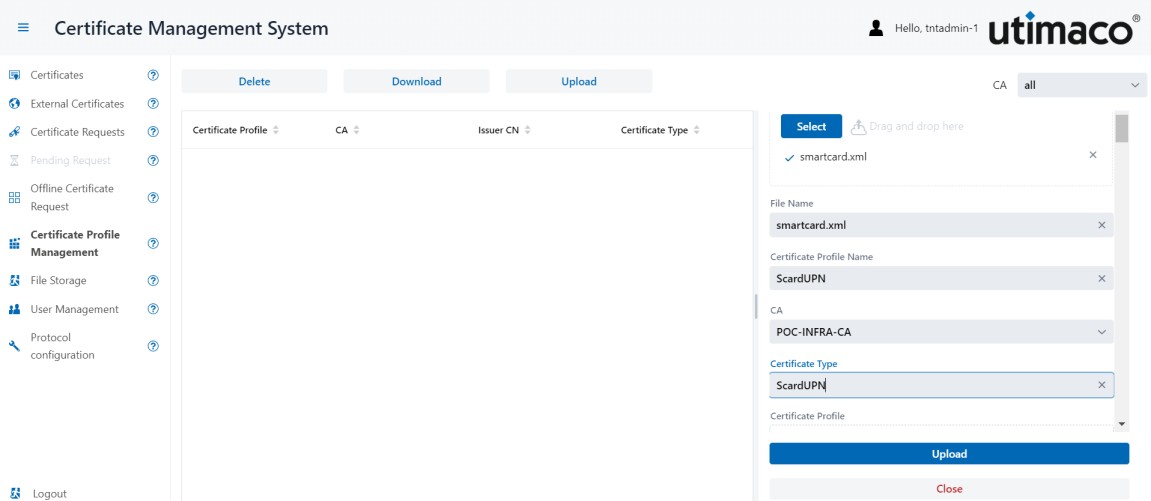
image-3284795609-1.jpg

Certificate Management System

  1. Once uploaded successfully, the certificate profile will be listed under Certificate Profile Management.
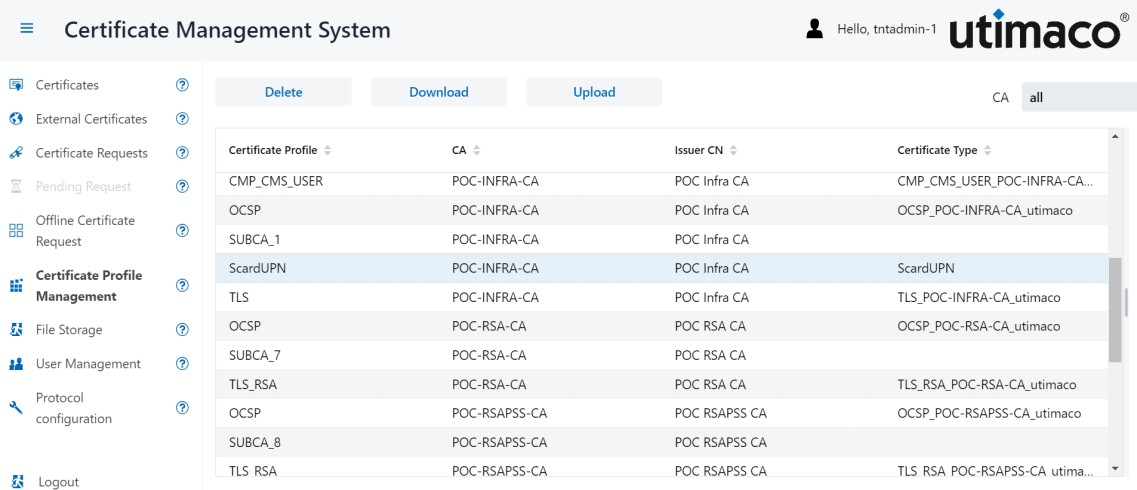
image-3284795609-2.jpg

Certificate Profile Management

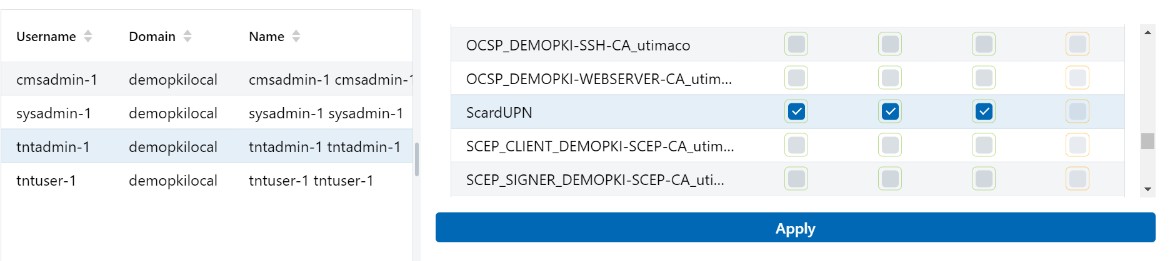
  1. Select the User Management option from CMS, then select the user with the admin privileges. For demonstration we have selected admin user tntadmin-1 available in the test environment. Select the permission View, Enroll and Revoke for certificate type ScardUPN.

image-3284795609-3.jpg


User Management

image-3284795609-4.jpg

User Management

  1. Click on Apply.