

The vESKM or ESKM L2 appliance can be integrated with the Utimaco CryptoServer LAN
Hardware Security Module (HSM) which is a special “trusted” network computer performing
a variety of cryptographic operations:
-
key management, key exchange, encryption etc.
-
Is built on top of specialized hardware.
-
The hardware is well-tested and certified in Utimaco's special laboratories.
-
Has a security-focused OS.
-
Has limited access via a network interface that is strictly controlled by internal rules
-
Actively hides and protects cryptographic material.
To configure the HSM integration in ESKM, perform the following steps:
-
Log in to the ESKM Management Console.
-
Select the Device tab.
-
In Device Configuration, click HSM Integration.
-
The HSM Integration dashboard is displayed.
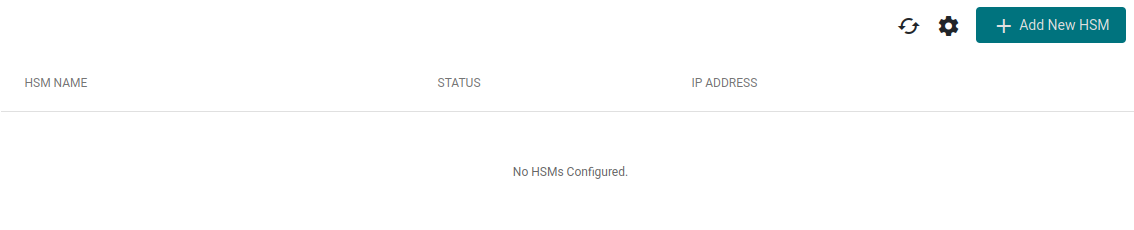
HSM Integration Dashboard
-
Click Add New HSM.
-
Enter the required information in the configuration form:
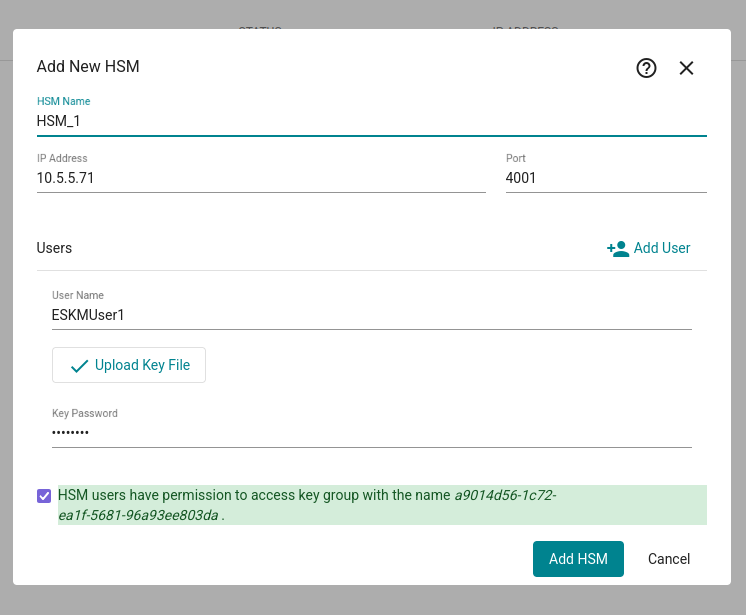
Add New HSM
-
Enter a name to identify the HSM.
-
Enter the IP address of the HSM.
-
Enter the communication port.
-
Enter the Crypto User name configured on the HSM.
-
Enter the password associated with the Crypto User.
-
Upload the corresponding key file.
-
Click Add HSM to register the HSM.

HSM Added (Not Enrolled)
-
Initially, the HSM will not be enrolled. Click on the 3 dots and then enroll to enroll the HSM and make it available

HSM Added and Available
The new HSM is now sucessfully added.
Please refer to the “CryptoServer” documentation to create the HSM users.
It is recommended to enroll 2 HSMs for redundancy. An ESKM supports
maximum number of 4 HSMs.