

Refer to steps 5 to 7 in Configuring on Dell Data Domain DD3300 and ensure that all the steps are completed before proceeding with the steps below.
-
Copy the host certificate signing request ( CertificateSigningRequest.csr ) from the Dell DD3300 for signing with the ESKM local CA.
-
Go to ESKM Management Console > Security > Certificates & CAs > Local CAs .
-
Select the previously created CA certificate name from the Sign with Certificate Authority.
-
Select Client in the Certificate Purpose section.
-
Copy the host certificate content to the Certificate Request box.
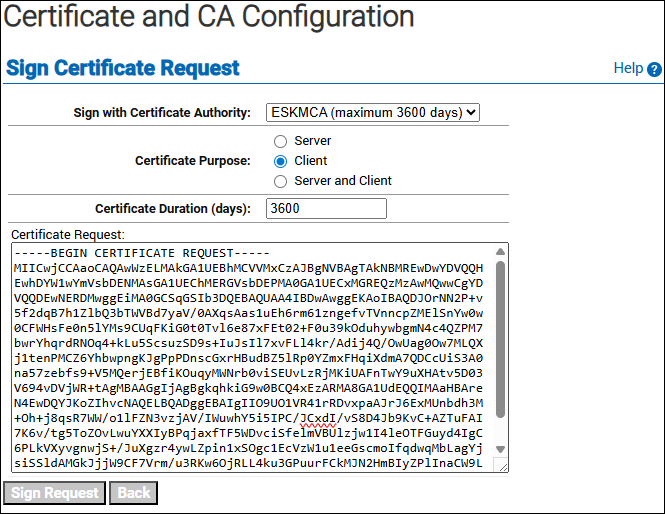
Sign Certificate Request
-
Click on the Sign Request button.
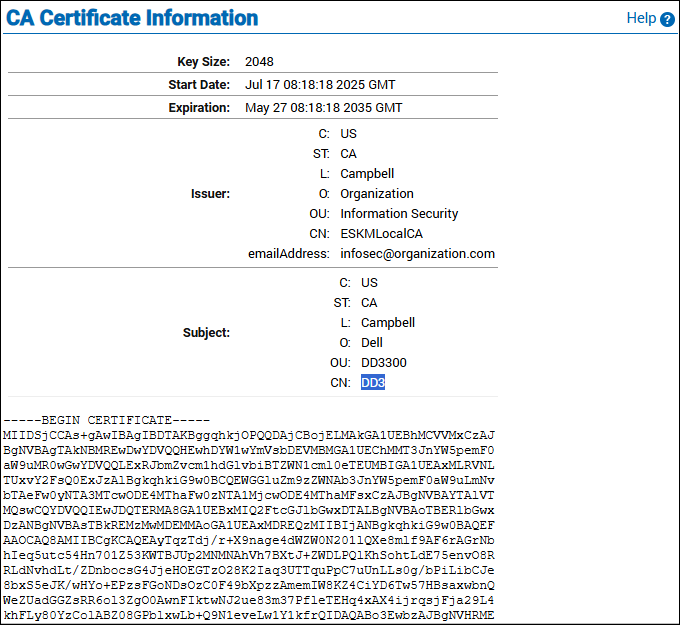
CA Certificate Information
-
Note down the common name and copy the signed certificate content to create a KMIP user.
-
Click Download button to download the signed host certificate file.