

Key rotation can be verified by changing the master key. A new key will be created, manually run the unwrap command specifying the old key and then feed the result into the wrap command specifying the new key. These operations can be performed when the database is running.
-
Create a new master key using pykmip.
New key can be created by executing the create.py script.
$ cd ~/pykmip/
$ python3.9 ./kmip/demos/pie/create.py -a AES -l 256
Postgres Linux server logs:
[enterprisedb@localhost bin]$ cd ~/pykmip/
[enterprisedb@localhost pykmip]$ python3.9 ./kmip/demos/pie/create.py -a AES -l 256
2025-07-03 07:57:09,343 - demo - INFO - Successfully created symmetric key with ID: 441555e4-e977-48bd-a710-d9942daf0fa3
[enterprisedb@localhost pykmip]$
-
Save the original
key.binin thepg_encryptiondirectory.
$ cd $PGDATA/pg_encryption
$ cp key.bin key.bin.original
-
Run the
unwrapcommand specifying the old key. Then feed the result into thewrapcommand, specifying the new key.
This is the command with old keyuuidand new keyuuid:
$ python3.9 /usr/edb/kmip/client/edb_tde_kmip_client.py decrypt --pykmip-config-file=/etc/pykmip/pykmip.conf --key-uid="12d8888e-a382-4762-b357-6050fff6f84e" --in-file=key.bin --variant=pykmip | python3.9 /usr/edb/kmip/client/edb_tde_kmip_client.py encrypt --out-file=key.bin --pykmip-config -file=/etc/pykmip/pykmip.conf --key-uid="441555e4-e977-48bd-a710-d9942daf0fa3" --variant=pykmip
-
Edit the
data_encryption_key_unwrap_commandwith the new key in thepostgresql.conffile.
Update the new keyuuidfor thedata_encryption_key_unwrap_commandinpostgresql.conffile.
Linux Postgres server logs to confirm changes:
[enterprisedb@localhost pg_encryption]$ grep -rn "data_encryption_key_unwrap_command" /var/lib/edb/as17/data/postgresql.conf
124:#data_encryption_key_unwrap_command = 'python3.9 /usr/edb/kmip/client/edb_tde_kmip_client.py decrypt --pykmip-config-file=/etc/pykmip/pykmip.conf --key-uid="12d8888e-a382-4762-b357-6050fff6f84e" --in-file=%p --variant=pykmip'
126:data_encryption_key_unwrap_command = 'python3.9 /usr/edb/kmip/client/edb_tde_kmip_client.py decrypt --pykmip-config-file=/etc/pykmip/pykmip.conf --key-uid="441555e4-e977-48bd-a710-d9942daf0fa3" --in-file=%p --variant=pykmip'
[enterprisedb@localhost pg_encryption]$
-
Restart the Postgres database.
Stop and start the Postgres database. Both operations should be successful.
Linux Postgres server logs:
[enterprisedb@localhost]$ /usr/edb/as17/bin/pg_ctl -D /var/lib/edb/as17/data -l $HOME/logfile stop
waiting for server to shut down.... done
server stopped
[enterprisedb@localhost]$
[enterprisedb@localhost]$ /usr/edb/as17/bin/pg_ctl -D /var/lib/edb/as17/data -l $HOME/logfile start
waiting for server to start.... done
server started
[enterprisedb@localhost]$
-
View the Postgres database.
Connect the databasehrwith/usr/edb/as17/bin/psql hr.
Linux Postgres server logs:
[enterprisedb@localhost pg_encryption]$ /usr/edb/as17/bin/psql hr
psql (17.5.0)
Type "help" for help.
hr=#
hr=# SELECT * FROM dept;
deptno | dname | loc
--------+------------+----------
10 | ACCOUNTING | NEW YORK
20 | RESEARCH | DALLAS
(2 rows)
hr=#
hr=# \q
[enterprisedb@localhost pg_encryption]$
-
Verify the ESKM KMIP logs.
See Log location and interpretation. The figure shows that the new master key is used for decryption when the database is started.
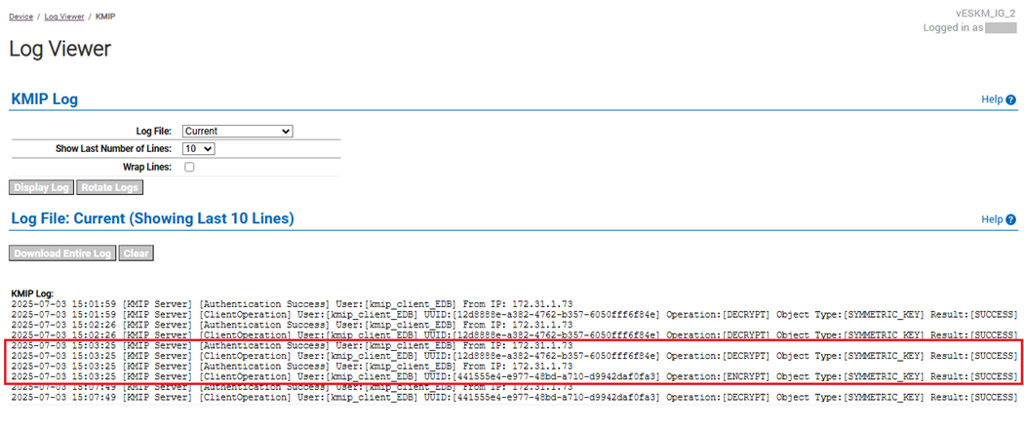
ESKM server: KMIP log of new key used for decryption