

The key is fetched on the database's startup. We test the data encryption by the key stored in the ESKM by disabling the ESKM KMIP service and then attempting to start the database. Since the Postgres Linux server is unable to connect with the ESKM KMIP service, the system should fail and report an error.
-
Stop the Postgres database.
Stop the database with this command.
$ /usr/edb/as17/bin/pg_ctl -D /var/lib/edb/as17/data -l $HOME/logfile stop
Postgres Linux server logs:
[enterprisedb@localhost bin]$ /usr/edb/as17/bin/pg_ctl -D /var/lib/edb/as17/data -l $HOME/logfile stop
waiting for server to shut down.... done
server stopped
[enterprisedb@localhost bin]$
-
Stop the ESKM KMIP service.
The ESKM KMIP service can be stopped from Utimaco ESKM by following these steps:-
Open the Utimaco ESKM page, log in, and click on the Device tab.
-
Click on Services under Maintenance.
-
Select KMIP Server under Services Configuration.
-
Click on Stop.
-
Click on Confirm on the Confirmation Required page.
-
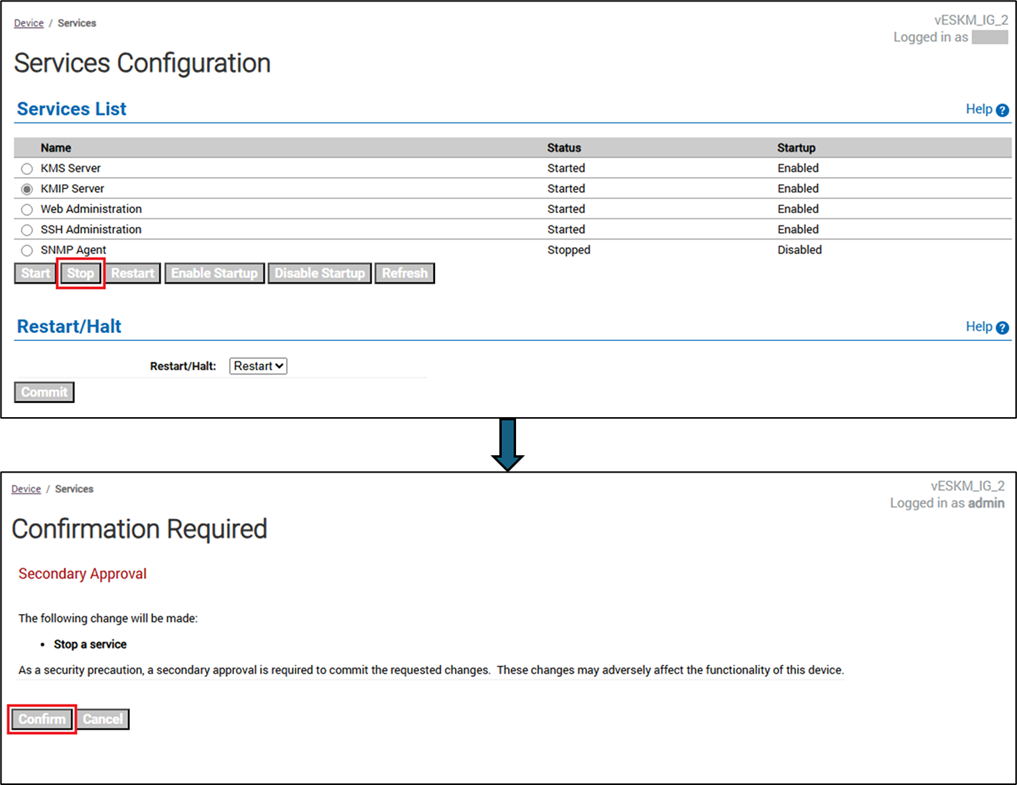
-
Start the Postgres database.
$ /usr/edb/as17/bin/pg_ctl -D /var/lib/edb/as17/data -l $HOME/logfile start
Postgres Linux server logs:
[enterprisedb@localhost bin]$ /usr/edb/as17/bin/pg_ctl -D /var/lib/edb/as17/data -l $HOME/logfile start
waiting for server to start.... stopped waiting
pg_ctl: could not start server
Examine the log output.
[enterprisedb@localhost bin]$
-
Verify the Postgres database log file.
The log file is$HOME/logfile. The log confirms that the Postgres Linux server cannot reach the ESKM server, so the database cannot start.
Postgres Linux server logs:
[enterprisedb@localhost bin]$ cat $HOME/logfile
An error occurred while connecting to appliance 172.31.1.82: [Errno 111] Connection refused
could not open client connection: [Errno 111] Connection refused
Traceback (most recent call last):
File "/usr/edb/kmip/client/edb_tde_kmip_client.py", line 111, in <module>
main()
File "/usr/edb/kmip/client/edb_tde_kmip_client.py", line 69, in main
with pykmip_client:
File "/var/lib/edb/pykmip/kmip/pie/client.py", line 1745, in __enter__
self.open()
File "/var/lib/edb/pykmip/kmip/pie/client.py", line 173, in open
self.proxy.open()
File "/var/lib/edb/pykmip/kmip/services/kmip_client.py", line 285, in open
six.reraise(*last_error)
File "/usr/lib/python3.9/site-packages/six.py", line 709, in reraise
raise value
File "/var/lib/edb/pykmip/kmip/services/kmip_client.py", line 274, in open
self.socket.connect((self.host, self.port))
File "/usr/lib64/python3.9/ssl.py", line 1376, in connect
self._real_connect(addr, False)
File "/usr/lib64/python3.9/ssl.py", line 1363, in _real_connect
super().connect(addr)
ConnectionRefusedError: [Errno 111] Connection refused
2025-07-03 07:42:42 PDT FATAL: could not run command "python3.9 /usr/edb/kmip/client/edb_tde_kmip_client.py decrypt --pykmip-config-file=/etc/pykmip/pykmip.conf --key-uid="12d8888e-a382-4762-b357-6050fff6f84e" --in-file=pg_encryption/key.bin --variant=pykmip": child process exited with exit code 1
2025-07-03 07:42:42 PDT LOG: database system is shut down
[enterprisedb@localhost bin]$
-
Start the ESKM KMIP service.
We can stop the ESKM KMIP service from Utimaco ESKM by following these steps:-
Open the Utimaco ESKM page, log in, and click on the Device tab.
-
Click on Services under Maintenance.
-
Select KMIP Server under Services Configuration.
-
Click on Start.
-
Click on Confirm on the Confirmation Required page.
-
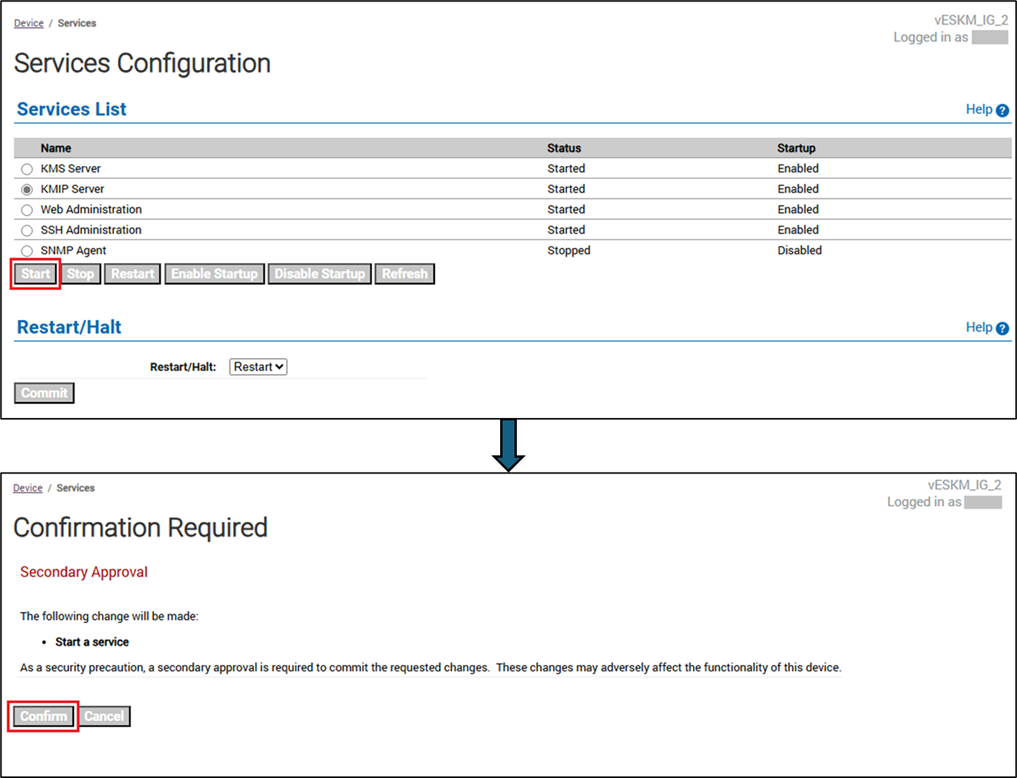
-
Start the Postgres database.
The database can be started using this command.
$ /usr/edb/as17/bin/pg_ctl -D /var/lib/edb/as17/data -l $HOME/logfile start
The logs confirm that the database start was successful.
Postgres Linux server logs:
[enterprisedb@localhost bin]$ /usr/edb/as17/bin/pg_ctl -D /var/lib/edb/as17/data -l $HOME/logfile start
waiting for server to start.... done
server started
[enterprisedb@localhost bin]$
-
Verify the ESKM KMIP logs.
See Log location and interpretation. The figure shows that the master key is used for decryption after the KMIP service and database are started.
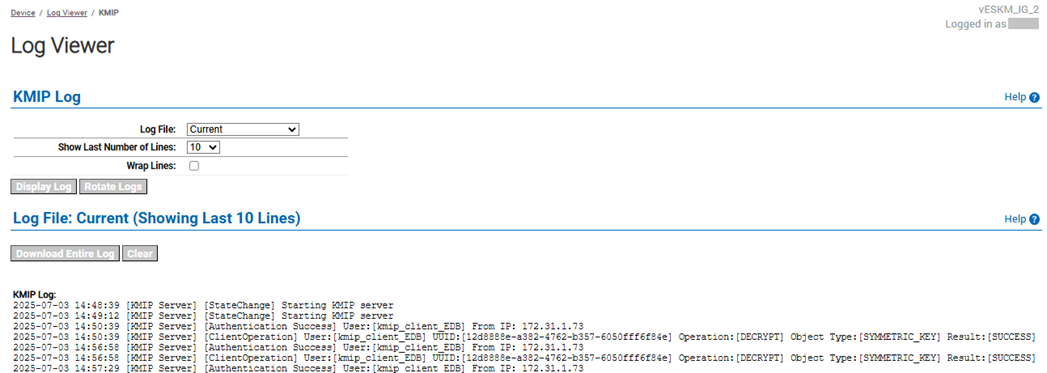
ESKM server: ESKM KMIP logs of the key used for decryption