

-
Log in to the Configuration utility
-
In the Main tab, select
System > Certificate Management > Traffic Certificate Management. The user will see the Traffic Certificate Management screen 3. Click on the Create button
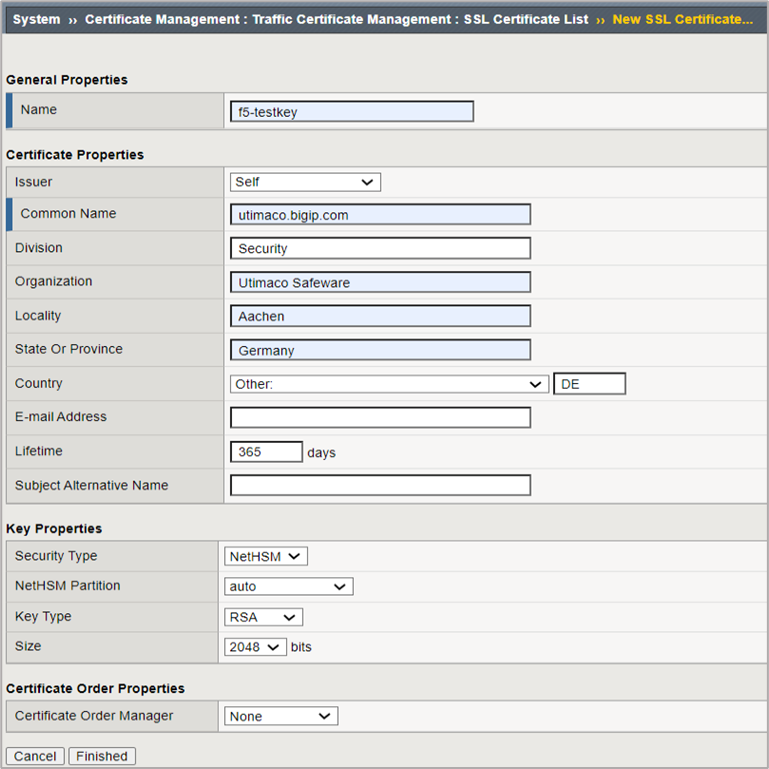
Figure 2: Generate Self-Signed Certificate
-
Enter a name for the SSL certificate
-
Select Self from the Issuer drop-down
-
Enter the other details from Certificate Properties section as required
-
In Key Properties, select NetHSM from the Security Type drop-down
-
Select auto from the NetHSM partition drop-down
-
Select the Algorithm from Key Type drop-down
-
Select a key size from the Size drop-down
-
Click on the Finished button