

-
Generate a key using PKCS#11 tool.
#./p11tool2 slot=0 LoginUser=12345678 PubKeyAttr=CKA_LABEL="F5-BIGIPImport2",CKA_ID=0x525341 PrvKeyAttr=CKA_LABEL="F5-BIGIPImport2",CKA_ID=RSA GenerateKeyPair=RSA
-
Verify that the key was generated.
#./p11tool2 LoginUser=12345678 ListObjects

  CKA_KEY_TYPE                   = CKK_RSA
  CKA_UNIQUE_ID                  = BC4C09DC-1446-45FC-8318-7EF5DF7F7A86
  CKA_LABEL                      = F5-BIGIPImport2
  CKA_ID                         = 0x525341 (RSA)

  CKA_KEY_TYPE                   = CKK_RSA
  CKA_UNIQUE_ID                  = 862415F9-DAD1-4E10-95C7-AA4D685D2C25
  CKA_SENSITIVE                  = CK_TRUE
  CKA_EXTRACTABLE                = CK_FALSE
  CKA_LABEL                      = F5-BIGIPImport2
  CKA_ID                         = 0x525341 (RSA)
-
Open BIG-IP in tmsh and run the command below.
(tmsh)#install sys crypto key F5-BIGIPImport2 from-nethsm security-type nethsm
(tmsh)#save sys config
-
Open the BIG-IP configuration utility.
-
In the Main tab, select System > Certificate Management >Traffic Certificate Management > SSL Certificate list and check the imported keys available in the table.
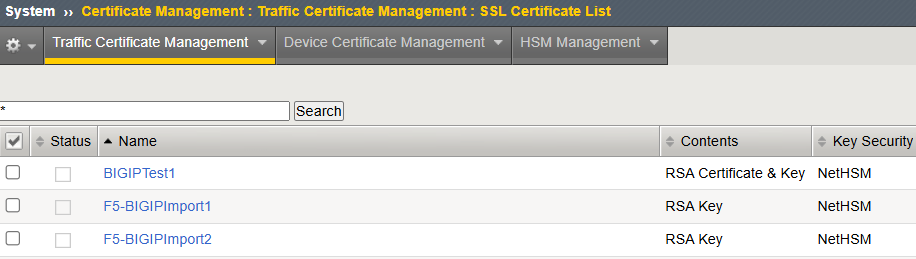
Imported Key displayed in table
-
Click on the Key name and click on the Key tab to check the Key ID.
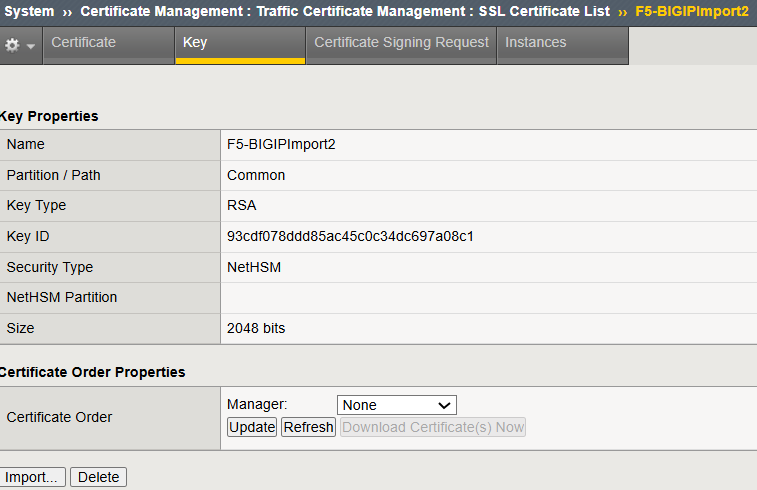
Imported Key Details