

Entropy augmentation allows Vault Enterprise to supplement its system entropy with entropy from an external cryptography module. It is designed to operate in environments where alignment with cryptographic regulations like NIST SP800-90B is required or when augmented entropy from external sources, such as hardware true random number generators (TRNGs), replaces system entropy when performing random number operations on critical security parameters (CSPs).
-
Add the following to the
/etc/vault/config.hclfile.
# Configure Seal with Utimaco SecurityServer
seal "pkcs11" {
 lib = "/opt/utimaco/lib/libcs_pkcs11_R3.so"
 slot = "<slot_no.>"
 pin = "<slot_PIN>"
 key_label = "hsm_demo"
 hmac_key_label = "demo"
 generate_key = "true"
}
# Vault configuration to use Utimaco PKCS#11 for entropy augmentation
entropy "seal" {
mode = "augmentation"
}
-
Restart the Vault service.
# systemctl restart vault.service
-
Log in to Vault using the Initial Root Token saved earlier.
# vault login <initial_root_token_vaule>
-
Execute the following command to enable the transit secrets engine with an external entropy source using the -
external-entropy-accessflag.
# vault secrets enable -external-entropy-access transit

Enable Entropy Augmentation
-
List the enabled secrets engine with the
-detailedflag.
# vault secrets list -detailed
Note that the External Entropy Access is set to true for transit/.
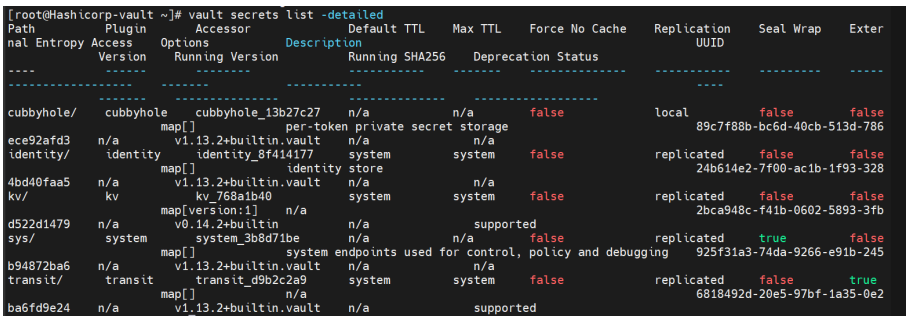
List Enable Secrets Engine
-
You can start using the transit secrets engine to encrypt your sensitive data. This engine leverages the HSM as its external entropy source. Now, create a new encryption key named "orders."
# vault write -f transit/keys/orders

New Encryption
-
Send a base64-encoded string to be encrypted by Vault.
# vault write transit/encrypt/orders plaintext=$(base64 <<< "4111 1111
1111 1111")

Base64-encoded String
-
Now, verify that you can decrypt.
# vault write transit/decrypt/orders
ciphertext=vault:v1:mBBYBUoICZ/igXKgkb9YPmWA+2b6upmZM1WqQEyiiiyGa6aq6bpqn0H
fqxpi89aJ

Test Decrypt Operation
-
Decode to get the original data.
# base64 --decode <<< NDExMSAxMTExIDExMTEgMTExMQo=4111 1111 1111 1111

Decode Original Data