

-
Click Security > Local Users & Groups > Local Groups.
-
Click the Add button in the Local Groups section.
-
Enter a group name (AlletraGroup in our example).
-
Select KMIP from the Group Type drop-down box.
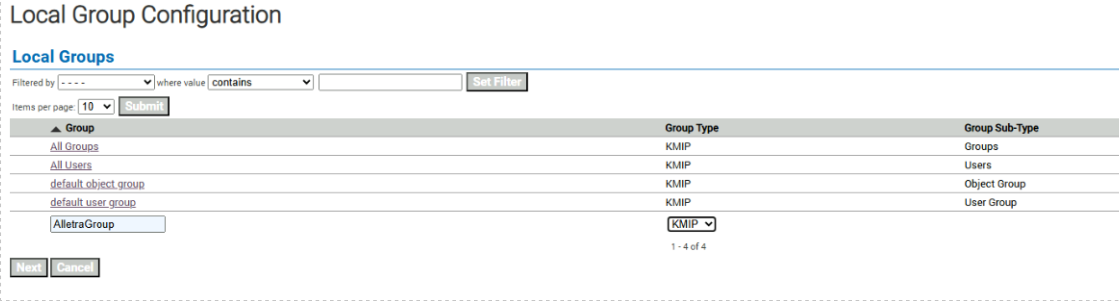
Create a KMIP group
-
Click Next.
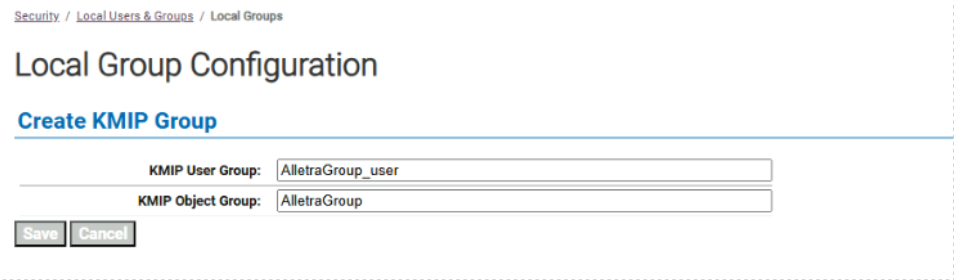
KMIP user group and object group created
-
Click Save.
The new KMIP group pair, consisting of a KMIP user group named AlletraGroup_user and a KMIP object group named AlletraGroup, will be created. By default, all users who are members of the KMIP user group AlletraGroup_user will have permission to perform all KMIP operations on the KMIP object group AlletraGroup. Refer to the ESKM User Guide for more information on KMIP user and object groups and permissions, and how to fine-tune permissions for KMIP users.