

Perform the following steps to create a local KMIP user in the ESKM.
A client license is required for each user created on the ESKM server. See the ESKM Installation and Replacement Guide for information about how to request and install the license pack.
-
Log in to the Management Console, and navigate to Security > Local Users & Groups > Local Users.
-
At the bottom of the list, click Add.
-
Create a “username” and “password” for the KMIP user.
The “Username” must match the “Common Name (CN)” provided during the client certificate creation.
-
Click the Enable KMIP option.
-
If required, from the drop-down lists, select the KMIP User Group and KMIP Object group to which the user belongs.
-
Paste the signed client certificate into the KMIP Client Certificate field.
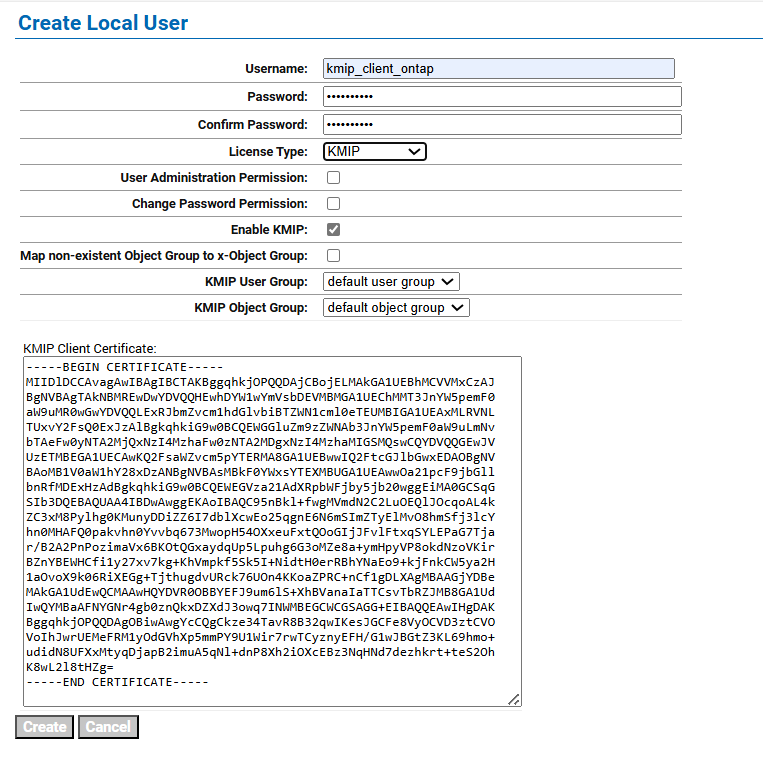
Create Local User
-
Click Create.
The user kmip_client_ontap now appears on the list of Local Users.
The configuration of the ESKM server is now complete.