9.11.1P19, 9.12.1P17, 9.12.1P19, 9.13.1P19, 9.14.1.P15, 9.15.1P16, 9.17.1P2, 9.18.1 9.11.1P19, 9.12.1P17 
Auto Light Dark
Auto Light Dark
9.11.1P19, 9.12.1P17, 9.12.1P19, 9.13.1P19, 9.14.1.P15, 9.15.1P16, 9.17.1P2, 9.18.1 9.11.1P19, 9.12.1P17 

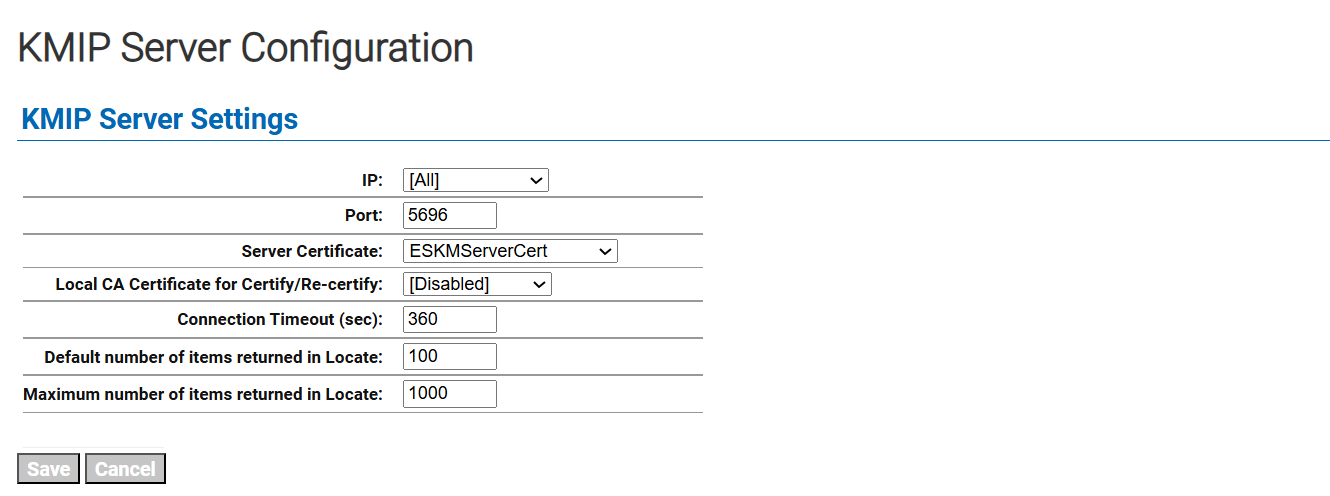
KMIP Server Configuration

  1. Go to the Device tab.  

  2. From the left side panel, click on the KMIP Server option listed under Device Configuration.  

  3. Click the Edit button on the main page. 

  4. Choose the above-created server certificate as the server certificate for the KMIP server.  

  5. Click the Save button.

kmip.png
KMIP Server Settings window.

KMIP Server Settings