Creating a local CA(Certificate Authority) and performing cryptographic operation with OpenSSL

  1. Open the \< OPENSSLDIR>\openssl.cnf file in a text editor and edit the [CA_default] section. Make the following changes

›_ Console

[ CA_default ]
dir	= C:\\localCA	# Where everything is kept
certs	= $dir/certs	# Where the issued certs are kept crl_dir	= $dir/crl	 # Where the issued crl are kept database	= C:\\localCA\\index.txt	# database index file. #unique_subject	= no	# Set to 'no' to allow creation of
# several certs with same subject. new_certs_dir	= C:\\localCA\\newcerts	# default place for new certs.
certificate = $dir/cacert.pem	# The CA certificate
serial	= C:\\localCA\\serial.txt	# The current serial number crlnumber	= $dir/crlnumber # the current crl number
# must be commented out to leave a V1 CRL crl	= $dir/crl.pem	# The current CRL
private_key = $dir/private/cakey.pem# The private key
tmpv_70w496.png

NOTE: You can change dir to the directory of your choice, but make sure to use correct path in the subsequent steps.

Here, We have created directory C:\localCA and new_certs_dir= $dir\newcerts

  1. Create the text files C:\localCA\index.txt and C:\localCA\serial.txt

  2. Create a directory C:\localCA\newcerts

  3. Open the C:\localCA\serial.txt file and write 01 at the top and click Enter. Save the file

  4. Create a key pair using pkcs11tool2

For RSA

›_ Console

C:\Program Files\Utimaco\SecurityServer\Administration>p11tool2 slot=7 LoginUser=123456 PubKeyAttr=CKA_LABEL="CAKey" PrvKeyAttr=CKA_LABEL="CAKey" GenerateKeyPair=RSA

This generates RSA 2048 CA private keys on the HSM

For ECDSA

›_ Console

C:\Program Files\Utimaco\SecurityServer\Administration>p11tool2 slot=7 LoginUser=123456 PubKeyAttr=CKA_LABEL="CAKey" PrvKeyAttr=CKA_LABEL="CAKey" GenerateKeyPair=ECC

Once key generation is complete, then add CKA_ID for both public and private ECDSA keys using

PKCS11# CryptoServer Administration tool.

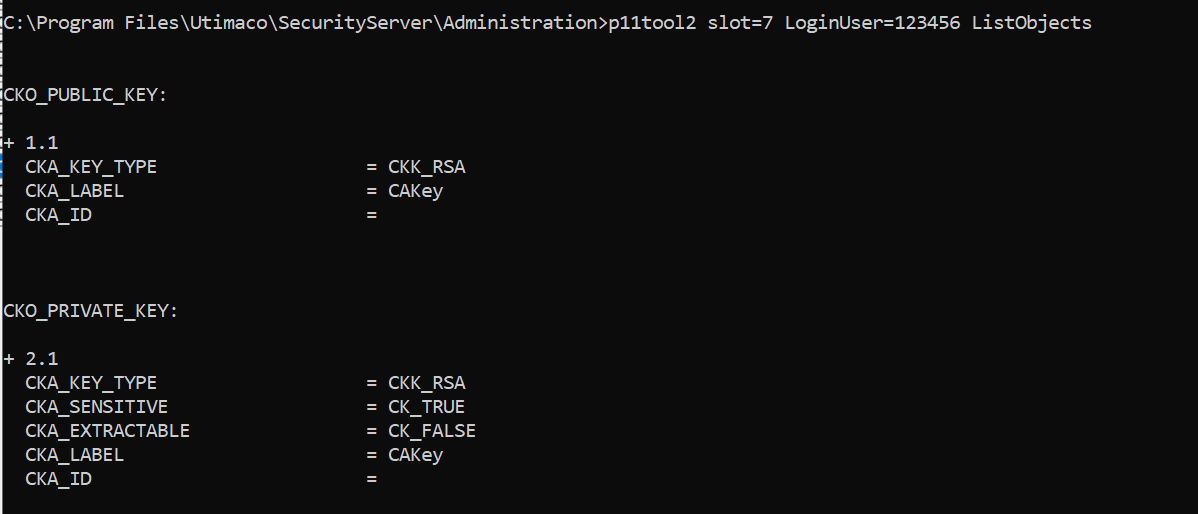
  1. Verify the key gets generated onto the HSM using following command

›_ Console

C:\Program Files\Utimaco\SecurityServer\Administration>p11tool2 slot=7 LoginUser=<hsm_password> ListObjects

For RSA

tmp697clip6.png

Figure 42: CA RSA Key list

For ECDSA:
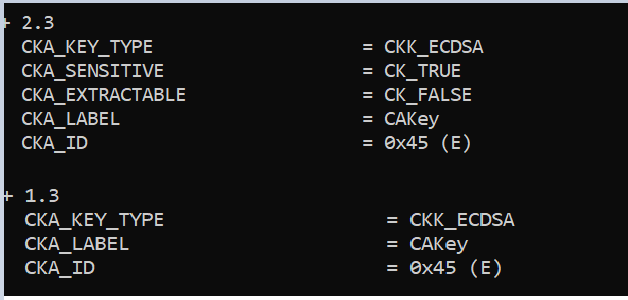
tmp8lxn8rew.png

Figure 43: CA ECDSA Key list

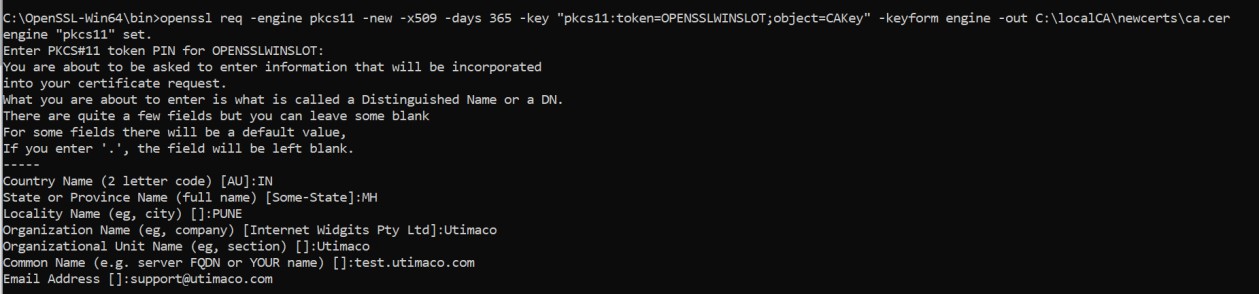
  1. Create a CA certificate based on the generated key that is used for signing other certificates

›_ Console

C:\OpenSSL-Win64\bin>openssl req -engine pkcs11 -new -x509 -days 365 -key "pkcs11:token=OPENSSLWINSLOT;object=CAKey" -keyform engine -out C:\localCA\newcerts\ca.cer
tmp469k5_a4.jpg

Figure 44: CA certificate generation output

Where CAKey is the object label for the CA private key on the Utimaco HSM created in Step 5 and OPENSSLWINSLOT is the token label. Provide Cryptouser PIN when prompted.