

If the environment has a High Availability setup, the HSMs must be synchronized.
-
Open the Crypto Administration Tool
-
Make sure the HSM is connected and in an operational mode
-
Select on Login/Logoff to open the Login/Logoff User window
-
Login the appropriate users to achieve the permission level of at least 22000000
-
Select Backup/Restore to open the CryptoServer Database Backup/Restore Wizard window
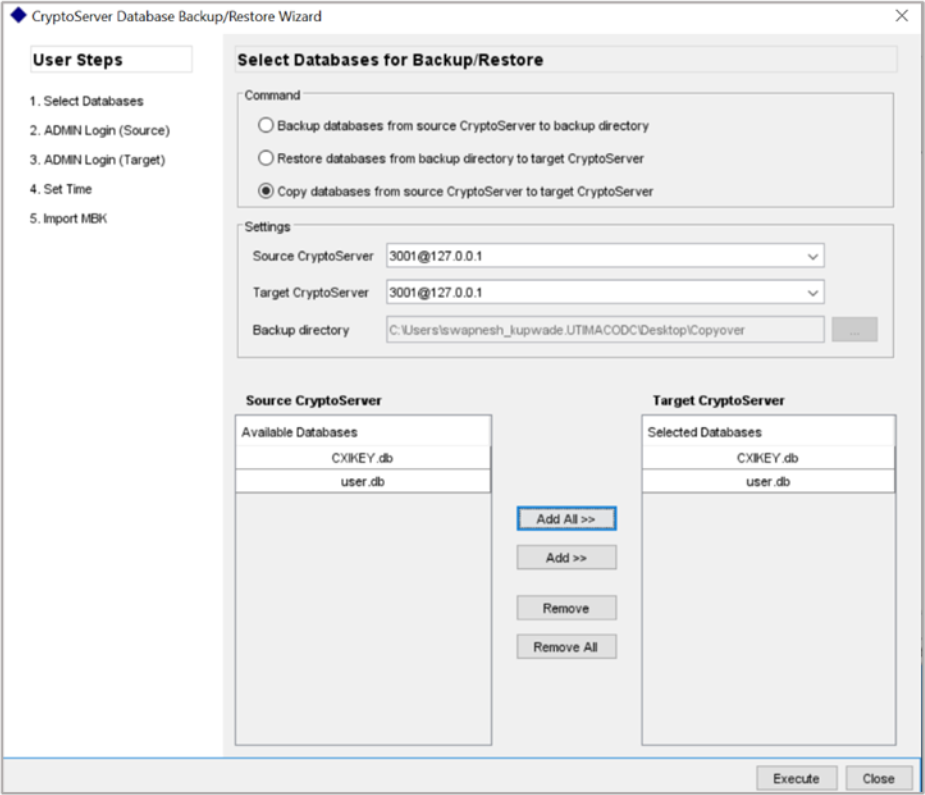
Figure 87: CryptoServer Database Backup/Restore Wizard window
-
In the Command section select Copy databases from Source CryptoServer to Target CryptoServer
-
In the Settings section Select the appropriate Source CryptoServer, if available select the appropriate Target CryptoServer, In the Backup directory section type the appropriate backup directory path (set to
C:\Program Files\Utimaco\CryptoServer\Administrationas default) or click … to browse to the appropriate directory -
Select the databases to copy
-
Click Execute
-
A confirmation window appears