

To generate SSL certifcate for IIS Server follow these steps:
-
Log into the NDES server using the <domain_name>\Administrator.
-
Create a NDES-SSL-Cert.inf file using a text editor as follows. Change the Subject field to the Fully Qualified Domain Name (FQDN) of the NDES Server.
|
›_ Console |
|---|
|
-
Open cmd and create a Certificate request file by running the following command.
|
›_ Console |
|---|
|
If you are using Smartcard Authentication, the prompt will go on the PIN Pad device to insert Smartcard and enter the pin. Then press OK button on the PIN Pad.
-
Copy the above certificate request file and send it to the CA for signing.
-
Once signed by CA paste the certificate back to NDES Server
-
Install the certificate by running the following command
|
›_ Console |
|---|
|
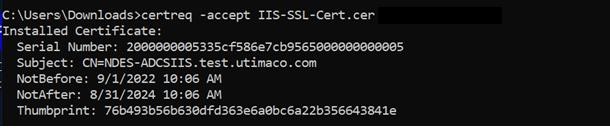
Output Window
If you are using Smartcard Authentication, the prompt will go on the PIN Pad device to insert Smartcard and enter the pin. Then press OK button on the PIN Pad.