Keys Rotation/Migration

Use the steps below to rotate the keys.

  1. Create a new MKEK Key by using the command below.

›_ Console

# su -s /bin/sh -c "barbican-manage hsm gen_mkek --library-path '/opt/utimaco/lib/libcs_pkcs11_R3.so' --passphrase 1234567890  --slot-id 3 --label 'mkek_utimaco1234' --length 32" barbican

'/etc/libcs_pkcs11_R3.so' --passphrase <Crypto_User_PIN>  -slot-id <slot_id>  --label 'mkek_utimaco1234' --length 32

image-20250612-105201.png
MKEK Key Generation
  1. Create a New HMAC Key by using the below command.

›_ Console

# su -s /bin/sh -c "barbican-manage hsm gen_hmac --library-path '/opt/utimaco/lib/libcs_pkcs11_R3.so' --passphrase 1234567890 --slot-id 3  --label 'hmac_utimaco1234' --length 32" barbican

image-20250612-105247.png
HMAC Key Generation
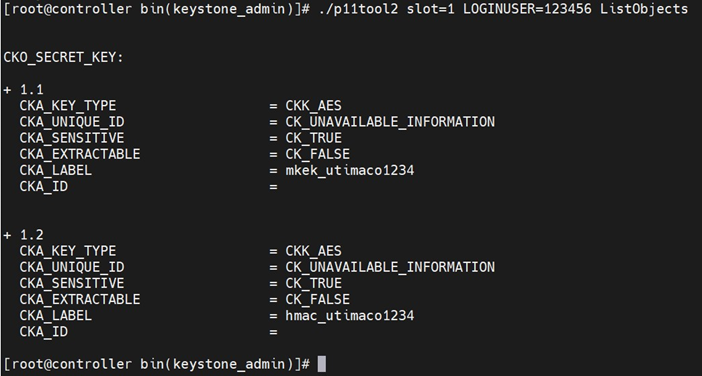
  1. Verify that the keys are generated on the Utimaco HSM using the p11tool2 command.

›_ Console

#./p11tool2 slot=<slot_id> LOGINUSER=<Crypto_User_PIN> ListObjects

image-20250612-105335.png
Key Listing
  1. Add a new label to the Barbican config file.
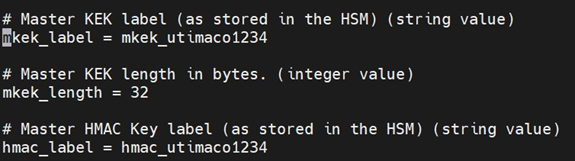
image-20250612-105413.png
Entries in barbican.conf file
  1. Restart OpenStack-Barbican-API and the https service.

›_ Console

# systemctl restart openstack-barbican-api.service

# systemctl restart httpd

  1. Run the rewrap_pkek command to rewrap pkek with the new mkek.

›_ Console

# su -s /bin/sh -c "barbican-manage hsm rewrap_pkek" barbican

image-20250612-105524.png
Key rewrap Output
  1. Restart the OpenStack-Barbican-API and httpd services.

›_ Console

# systemctl restart openstack-barbican-api.service

# systemctl restart httpd

  1. Verify that you can get the secret generated earlier.

›_ Console

# openstack secret get http://barbican:9311/v1/secrets/8ac7918d-36ce-

4cae-b1d9-a2a818ea30a0 --payload

image-20250612-105646.png
Get secret with payload

This completes the integration of OpenStack Barbican and Utimaco HSM.