

The encryption algorithm used to encrypt secret payloads before they are stored in the database is configurable and depends on the PKCS#11 mechanism supported by the connected HSM.
By default, AES in CBC mode (CKM_AES_CBC) is used to encrypt the payloads. However, Barbican and u.Trust GP HSM also support additional encryption mechanisms, such as AES in GCM mode (CKM_AES_GCM).
Follow these steps to change the encryption mechanism, store a secret, and verify its use:
-
Edit the Barbican configuration file
barbican.confusing your preferred text editor and update theencryption_mechanismparameter underp11_crypto_plugin].
|
|
|---|
|
|
Save the file after making the change.
It is important to note that changing the encryption mechanism affects only newly created secrets. Existing secrets remain encrypted using the mechanism that was active at the time of their creation and can not be decrypted with a different mechanism.
-
Restart the OpenStack Barbican service.
|
|
|---|
|
|
-
Generate a new secret.
|
|
|---|
|
|
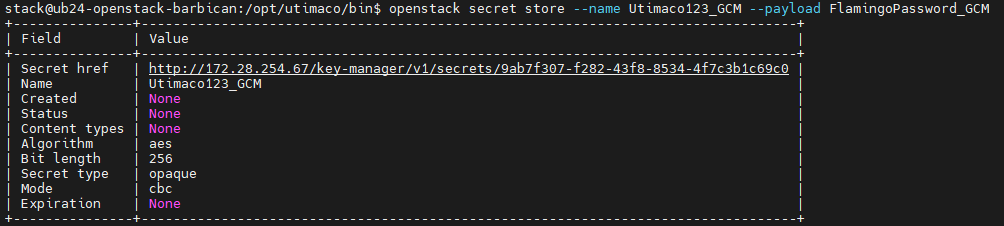
Storing a secret after changing the encryption mechanism
-
Verify the encryption mechanism used via the PKCS#11 log file
cs_pkcs11_R3.log.

-
Verify the encryption mechanism used via Barbican database.
|
|
|---|
|
|
|
|
|---|
|
|
The newly created secret will appear at the top of the table.
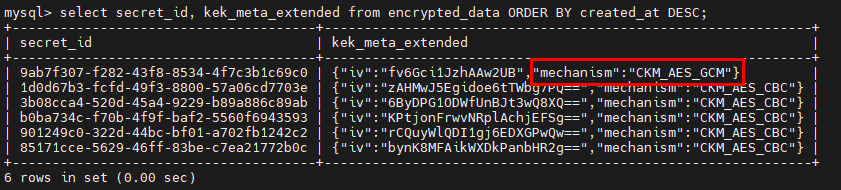
Table showing encryption mechanism used
-
Confirm that the secret payload can be retrieved.
|
|
|---|
|
|

Retrieving secret value with correct encryption mechanism
-
Change the
encryption_mechanismparameter in thebarbican.confback toCKM_AES_CBCand restart the Barbican service. -
Attempting to retrieve the secret payload again results in an internal server error.

Internal server error after attempting to retrieve payload with wrong mechanism
-
An error also appears in the PKCS#11 logs that indicates that the decryption operation was attempted using parameters that do not match the original encryption mechanism. In this case the parameter is the initialization vector (IV) format and length as CKM_AES_CBC requires a 16-byte IV and CKM_AES_GCM requires a GCM parameter structure containing an IV (typically 12 bytes). If an IV does not match the requirements of the selected mechanism, the HSM rejects the operation.
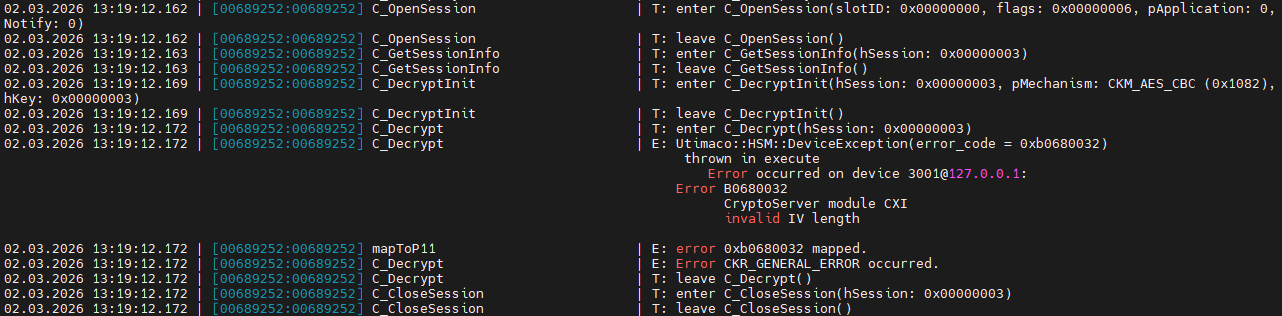
Invalid IV length error in PKCS#11 logs