

Version 7.0.0 and later of the Appliance supports Utimaco Atalla HSM AT1000 hardware, version
8.50. Before you begin your migration to version 7.0.0 (or later) of the Appliance, review the migration steps in the OpenText™ Data Privacy and Protection Appliance Installation Guide and review the HSM integration requirements in Getting Started.
Support for using AES districts with Utimaco Atalla AT1000 HSM version 8.30 was added in version 6.8 of the Appliance. The minimum supported versions are Appliance version 6.8 and HSM AT1000 version 8.30.
If you are upgrading or migrating an Appliance with a version older than 6.8, and HSM AT1000 version that is older than version 8.20, you must update the Appliance before updating your HSM.
If your Appliance and AT1000 HSM are running newer software than the minimum supported versions, you can update in any order.
To migrate to version 7.0.0 (or later) of the Appliance before upgrading AT1000(s) to 8.30 and later:
-
Backup of your Appliance and current Atalla AT1000 configuration.
-
Follow migration steps in the Installation Guide to migrate your Appliance to 7.0.0 (or later).
-
Upgrade your AT1000(s) to version 8.30 (or later).
-
If it does not already exist, configure an AES MFK (AMK) on the AT1000(s).
-
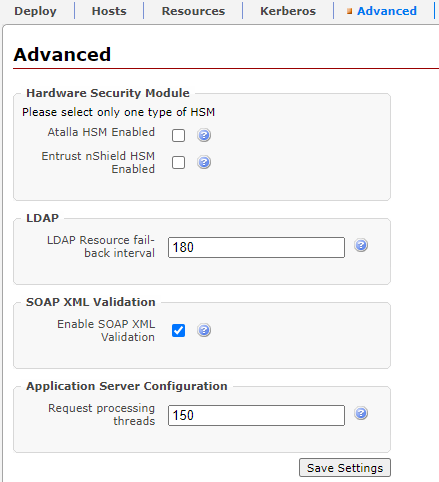
On the Management Console, on the System > Advanced page, clear the Atalla HSM Enabled check box and click Save Settings, and then select the Atalla HSM Enabled check box and click Save Settings deselect and save, then select and save the Atalla HSM Enabled check box. This is necessary to ensure HSM FEK is being used.
-
Deploy the changes. The FEK is now protected by the AT1000 HSM AMK.
For existing Appliances being migrated to version 7.0.0 (or later), the AT1000(s) with software version 8.30 (or later) require both your existing 3DES MFK to support existing districts and an AES MFK (AMK) for new district creation on version 7.0.0 (or later) of the Appliance.