-
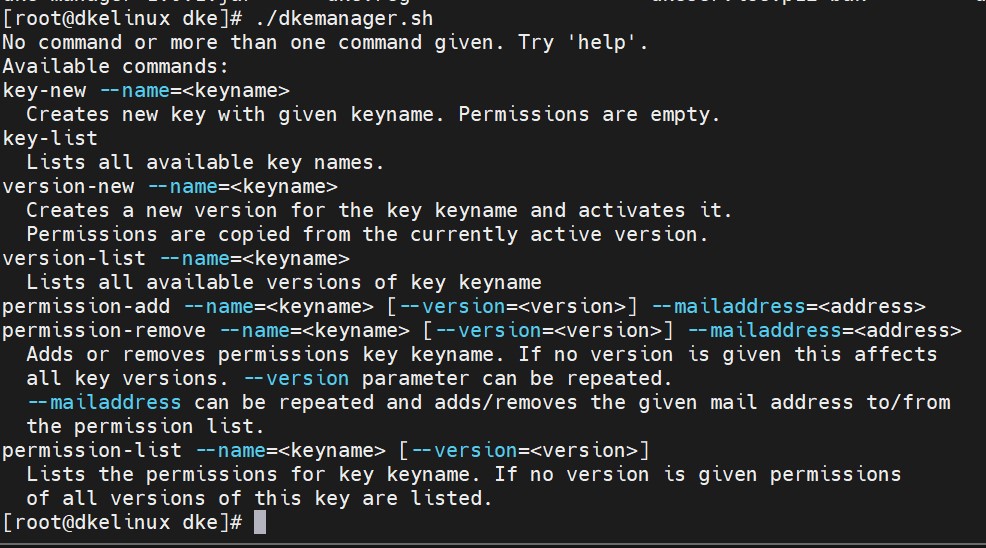
Execute the following command to list the available option of DKE Anchor Manager
|
›_ Console
|
|
# ./dkemanager.sh
|
Utimaco DKE Manager available options
-
Generate a Key.
This will generate an RSA 2048-bit key, which will be used by DKE Anchor Service.
|
›_ Console
|
|
# ./dkemanager.sh key-new --name=<keyname>
Example
#./dkemanager.sh key-new --name=DKE_Key
|
Utimaco DKE Key creation
-
List the generated keys.
|
›_ Console
|
|
# ./dkemanager.sh key-list
|
dkemanager key-list output
-
Add Authorized Users to this key.
|
›_ Console
|
|
# ./dkemanager.sh permission-add --name=<keyname> [--version=<version>] -mailaddress=<address>
# If you would like to add the users to all available versions of key, don't pass the version parameter in the command
Example
# ./dkemanager.sh permission-add --name=DKE_Key -mailaddress=testuser1@pls786.onmicrosoft.com
#./dkemanager.sh permission-add --name=DKE_Key -mailaddress=testuser3@pls786.onmicrosoft.com
# If you would like to add the users to specific available versions of key, pass the version parameter in the command
Example:
# ./dkemanager.sh permission-add --name=DKE_Key --version=a257be08-e77b-48aa-
99bb-e5dac3b646c3 --mailaddress=testuser2@pls786.onmicrosoft.com
|
Add authorized users to use the DKE_Key
Add authorized user to uses the DKE_Key with version
-
List Authorized Users for Key
|
›_ Console
|
|
# ./dkemanager.sh permission-list --name=<keyname> [--version=<version>]
# If you would like to list the users of all available versions of key, don't pass the version parameter in the command
Example:
# ./dkemanager.sh permission-list --name=DKE_Key
# If you would like to list users of specific versions of key,
Example:
# ./dkemanager.sh permission-list --name=DKE_Key --version=a257be08-e77b-48aa-
99bb-e5dac3b646c3
|
List authorized users for DKE_Key
List authorized user for unique version of DKE_Key