

ESKM server certificates are used by the client to authenticate the ESKM server during the TLS/SSL handshake. ESKM supports two types of clients. Clients that use the ESKM protocol are referred to as ESKM clients. Clients that use the KMIP protocol are referred to as KMIP-enabled clients. The ESKM clients communicate with the KMS server and KMIP-enabled clients communicate with the KMIP server.
During the execution of the Setup utility a default KMIP Server Certificate is automatically created. This certificate should only be used for testing purposes, as it is a self-signed certificate. If your ESKM system will be communicating with KMIP-enabled clients, Utimaco highly recommends that you create a new KMIP server certificate. The name you assign to these server certificates should clearly indicate their purpose. For example:
ESKM KMS Server and ESKM KMIP Server.
KMIP requires mutual authentication. After configuring the KMIP server, enable KMIP client certificate authentication. The KMIP client certificate authentication status is disabled by default.
If you will be using a third-party CA, and wish to use an existing server certificate, see Import a Third-Party Server Certificate.
To create an ESKM server certificate, perform the following steps:
-
Click the Security tab.
-
In Certificates and CAs, select Certificates.
-
Enter information required by the Create Certificate Request section of the window to create the ESKM server certificate.
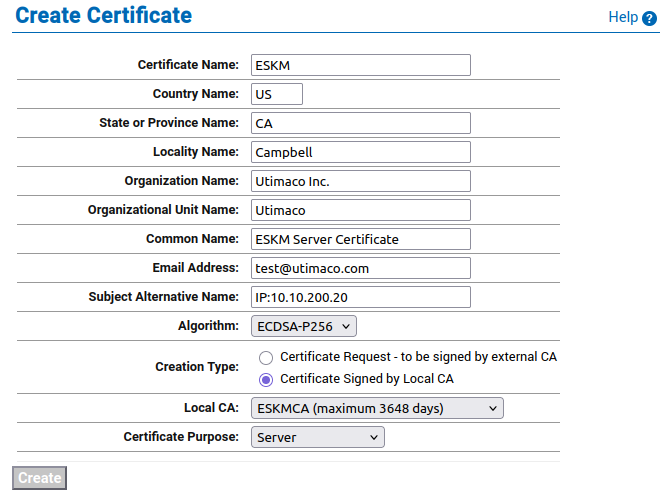
Create Certificate Request
a. Enter a Certificate Name and Common Name, for example ESKM KMS Server.
b. Enter your Organizational information.
c. Enter the Subject Alternative Name, and Algorithm. Utimaco recommends using an algorithm with security strength of at least 128 bits (e.g., ECDSA-P256).
d. Select the Local Certificate Authority (CA) to be used for signing the certiifcate.
e. Select the Certificate Purpose (e.g., Server or Client).
-
Click Create Certificate Request.
The certificate is automatically signed by the selected Local CA and becomes active immediately. No manual CSR export, signing, or certificate installation steps are required.
Repeat all of the steps above for the KMIP server certificate. You must perform these steps on each ESKM server after joining the cluster.
The “certificate name” must remain same on all ESKM servers across the cluster.
Import a third-party server certificate
An externally generated public/private key pair can be imported into the ESKM system for use as a server certificate. The encrypted private key data and the public key certificate must be present in the third-party server certificate file. For example:
-----BEGIN ENCRYPTED PRIVATE KEY-----
MIIFDjBAB..........vvbKI=
-----END ENCRYPTED PRIVATE KEY-----
-----BEGIN CERTIFICATE-----
MIIDhjCCA..........MKH9Fk
-----END CERTIFICATE-----
In addition, the password for the private key file must be known.
To import a third-party server certificate, perform the following steps:
-
In Certificates & CAs, click Certificates to display the Import Certificate section.
-
Provide the source location of the certificate file.
-
Enter the Certificate Name and private key password.
-
Click Import Certificate.