Generating the encryption Key and Certificate on Utimaco HSM

  1. Generate the RSA key using p11tool2.

›_ Console

# p11tool2 Slot=14 LoginUser=ask 

PubKeyAttr=CKA_LABEL="LUKSPublicKey",CKA_ID=0x45 

PrvKeyAttr=CKA_LABEL="LUKSPrivateKey",CKA_ID=0x45 GenerateKeyPair=RSA 
image-3286204743-1.jpg

Key generation output

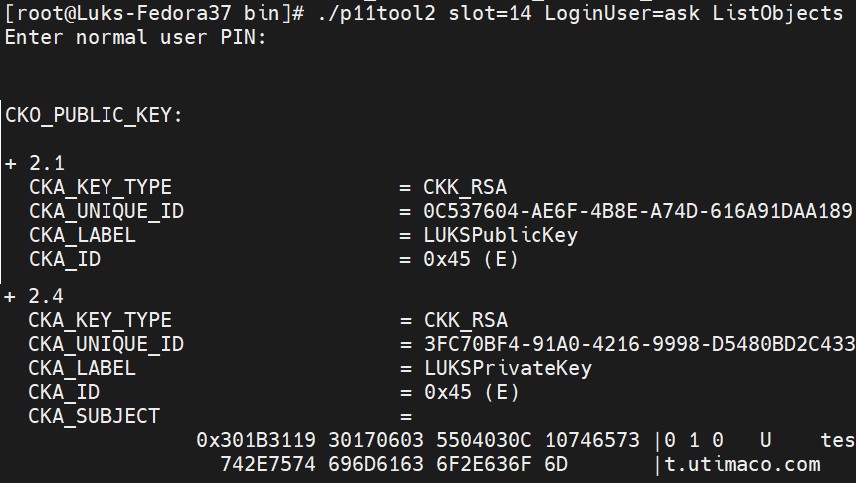
  1. Verify that the keys are generated onto the HSM using following command.

›_ Console

# p11tool2 slot=<no> LoginUser=ask ListObjects 

Example

image-3286204743-2.jpg

Key list using p11tool2

  1. Generate a self-signed certificate.

›_ Console

# openssl req -x509 -engine pkcs11 -keyform engine -new -key 

"pkcs11:token=UTILUKS;object=LUKSPrivateKey" -sha256 -out lukscert.pem subj "/CN=test.utimaco.com" 

Here LUKS is the token label and LUKSPrivateKey is the key on the HSM. Provide Cryptouser PIN when prompted.

image-3286204743-3.jpg

Self sign certificate generation

It is recommended to use CA signed certificate for production environment.

  1. Convert lukscert.pem to lukscert.der format.

›_ Console

# openssl x509 -outform der -in lukscert.pem -out lukscert.der 
image-3286204743-4.jpg

Certificate type change output

  1. Import the certificate.

›_ Console

# p11tool2 slot=14 LoginUser=ask 

CertAttr=CKA_LABEL="LUKSCERT",CKA_ID=0x45 

PubKeyAttr=CKA_LABEL="LUKSPrivateKey",CKA_ID=0x45 

ImportCert=/opt/utimaco/bin/lukscert.der 
image-3286204743-5.jpg

Certificate import using p11tool2

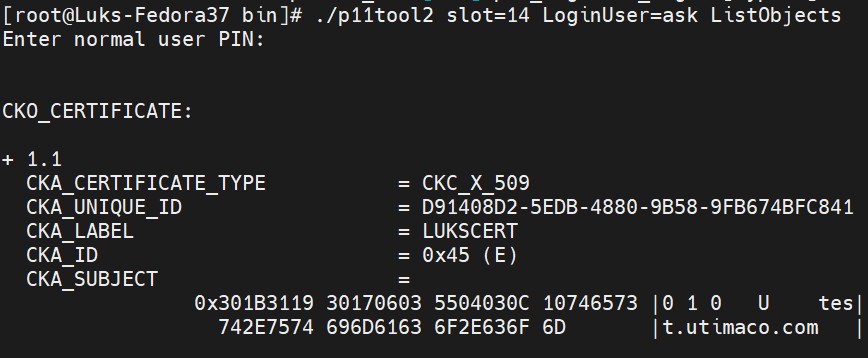
  1. Check the certificate on HSM.

›_ Console

# p11tool2 slot=<no> LoginUser=ask ListObjects 
image-3286204743-6.jpg

Certificate list output