

Create users SO (Security Officer) and USR (the Crypto user) and initialize a slot.
The slot must be initialized using the p11tool2 or p11cat.
Please refer to Utimaco’s user guidance for complete instructions. The basic procedure goes as follows:
-
Log on with the account(s) that give you the User Manager permission.
-
Initialize Token (Init Token under Slot Management) in p11cat and set a SO-PIN.
-
Log out, and log in again as SO.
-
Use the Set PIN function to change the initial SO-PIN.
-
Log in as SO again with the new SO-PIN.
-
Use Init PIN to initialize the user PIN with the initial PIN value.
-
Log out and log on as User.
-
Use Set PIN function to change the initial user PIN. Log out.
Now the slot and token are ready to be used with APM.
Make sure that the u.trust GP HSM is accessible from APM. You can verify it by opening PKCS11Connector plug-in’s configuration dialog. You can use one of the included sample solutions. Verify that the PKCS#11 library path is correct, and check that you can find the slot in the Slot name dropdown.
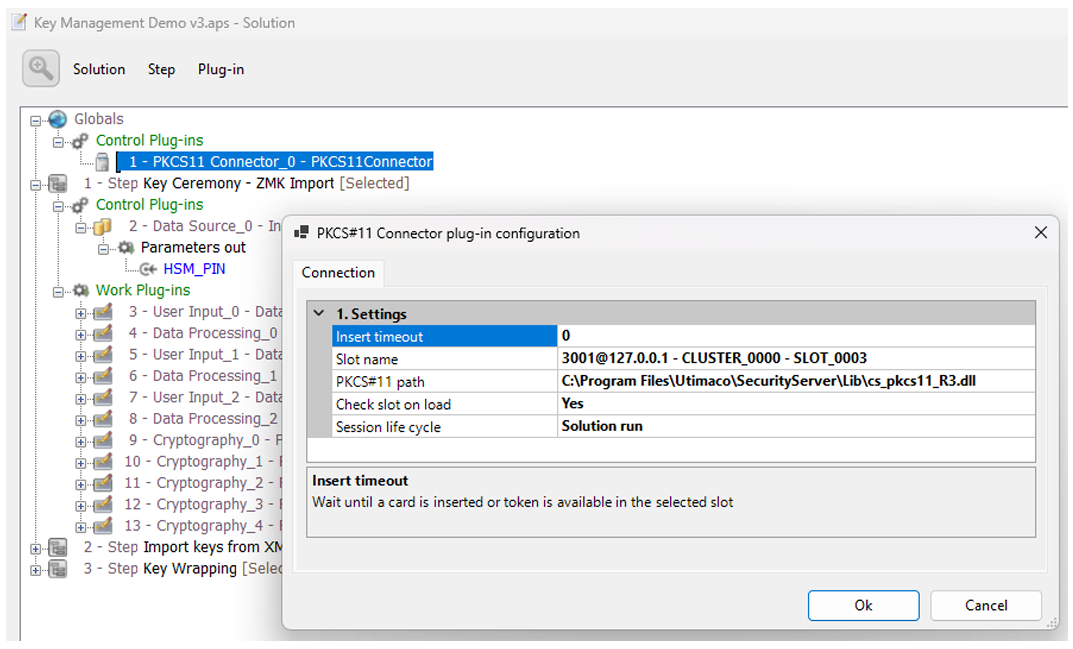
HSM Connection Verification