

-
Configure the following information in the ESKM management console.
-
Navigate to the Advanced Rest Settings on the Rest Configuration page (Device > Rest Server >Advanced Rest Settings).
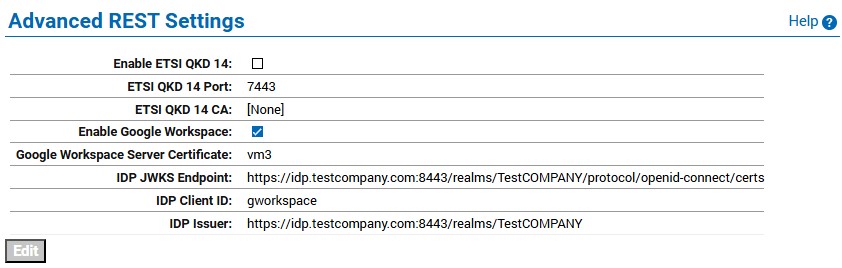
Advanced Rest Settings
-
Select the Enable Google Workspace checkbox.
-
Select the Google Workspace Server Certificate from the drop-down list.
This certificate should be different from the Server Certificate configured in the Rest Server Settings. -
Specify the IDP JSON Web Key Set (JWKS) Endpoint URL.
ESKM uses this URL to fetch JWKS to validate authentication token.
This URL is likely in the following format:
https://<idp-domain-name>/realms/ <realm-name>/protocol/openid-connect/certs
-
Specify the IDP Client ID.
The Client ID should match the one configured in both the Identity Provider (IDP) and the Google Workspace Admin Console. -
Specify the IDP issuer of the authentication token and it is checked against the 'iss' claim to verify the token's origin.