

The CryptoServer installer software CryptoServerSetup-X.XX.X.X.exe, which you can find on the delivered product CD, automatically copies the necessary files and registers the provider. The CSP/CNG Interface must be selected when running the installer.
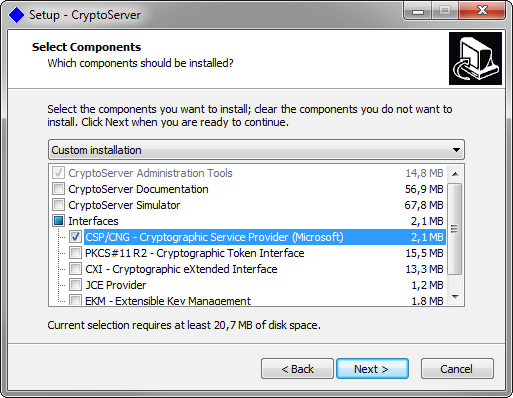
CryptoServer Setup - Components Selection
It is recommended to use a separate machine for the simulator. You can reach the simulator with 3001@<IP-ADDRESS>. If you want to use the simulator on the same machine, please select the CryptoServer Simulator as well when running the installer.
If not already done, generate a new cryptographic user (level 2 in group 0) with rights in the required CXI group. Open the configuration file for the CSP/CNG provider. The environment variable CS_CNG_CFG contains the path and name of the configuration file. It is set by default during the host software installation to C:\ProgramData\Utimaco\CNG\cs_cng.cfg. Edit this file for your installation. Most important parameters are described here. You can find a detailed description about all parameters in the document CryptoServer_Manual_CSP_CNG.pdf, located in the product CD at \Documentation\Crypto_APIs\CSP-CNG\CryptoServer_Manual_CSP_CNG.pdf.
|
Parameter |
Description |
|---|---|
|
KeysExternal |
Specifies the type of the key storage: internal or external. This setting is of type Boolean. If If |
|
KeyStore |
Specifies the path to the external key storage (default |
|
ExportPolicy |
Defines which export properties cannot be set by a CNG user. 0: CSP keys are exportable as plaintext. 1: CSP keys can be exported when wrapped with another key. 2: CSP key export is denied completely. |
|
Group |
Defines the key group, which is assigned to new keys and to which keys shall belong in order to be accessible to the CryptoServer CSP/CNG provider. |
|
Device |
Specifies the device address of the CryptoServer device to connect to the CSP/CNG provider. This parameter can only specify a single device address per statement. There might be multiple A connection to the next device(s) is automatically requested if the previous one(s) does not respond. Valid device specifiers:
Simulator.
|
|
Login |
Specifies the authentication credentials for the CryptoServer CNG-user, who is the only user permitted to generate and access cryptographic keys. The exact syntax of the different authentication types is described in the following subchapter. |