

-
Update the System Packages. First, ensure that the system package repository is up to date.
sudo dnf update -y
This command updates all installed packages to their latest versions to ensure compatibility and avoid dependency-related issues during installation.
-
Install the necessary tools required for downloading and managing packages.
sudo dnf install -y wget curl tar
wget and curl are used for downloading files from external sources.tar is used for extracting compressed archives if required during setup.
-
Install the DNF plugins package and add the Cloudflare GoKeyless repository.
sudo dnf install -y dnf-plugins-core
sudo dnf config-manager --add-repo https://pkg.cloudflare.com/gokeyless.repo
dnf-plugins-core enables repository management features. The Cloudflare repository is added to allow installation of the GoKeyless package directly using the package manager.
-
Install the GoKeyless package from the configured repository.
sudo dnf install -y gokeyless
This installs the Cloudflare GoKeyless daemon, which acts as a bridge between Cloudflare’s edge servers and the private key stored in the HSM.
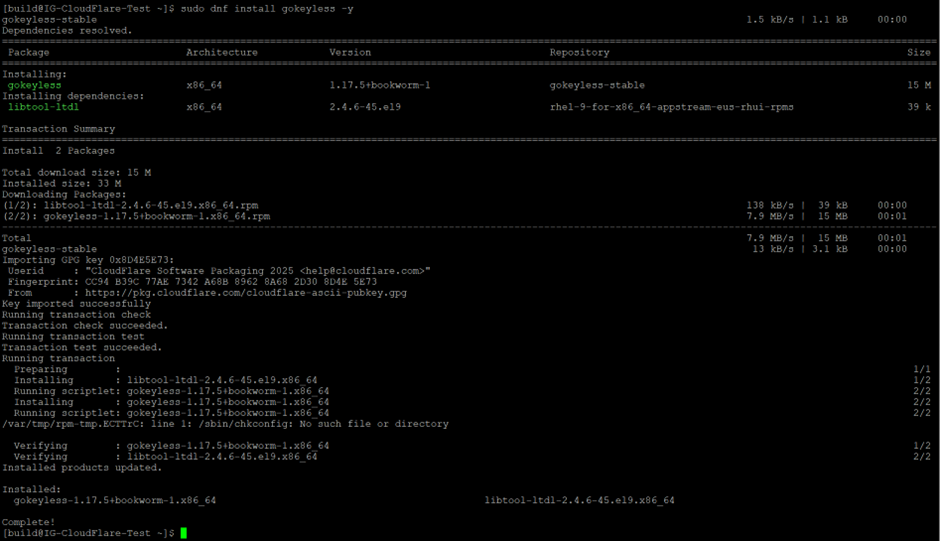
GoKeyless setup and package installation
-
Configure file permissions.
sudo chmod 644 /etc/keyless/gokeyless.yaml
-
Add the required user (e.g.,
build) to thekeylessgroup.
sudo usermod -aG keyless build
-
Check the installed GoKeyless version.
gokeyless --version

GoKeyless version details