

Key Rotation is the process of creating a new version of an encryption key while retaining older key versions for decrypting existing data.
When a new key version is created in ESKM, the previously created key versions are retained and continue to be used for decrypting existing data. The newly created key version becomes the current (default) key for encrypting new data.
This capability enables the creation of a new version of the key on-demand for the purposes of compliance or suspected compromise without changing the key ID or disrupting active cloud applications.
To rotate a key in Azure Cloud
-
After creating a new version of the encryption key, go to the Actions column for the key.
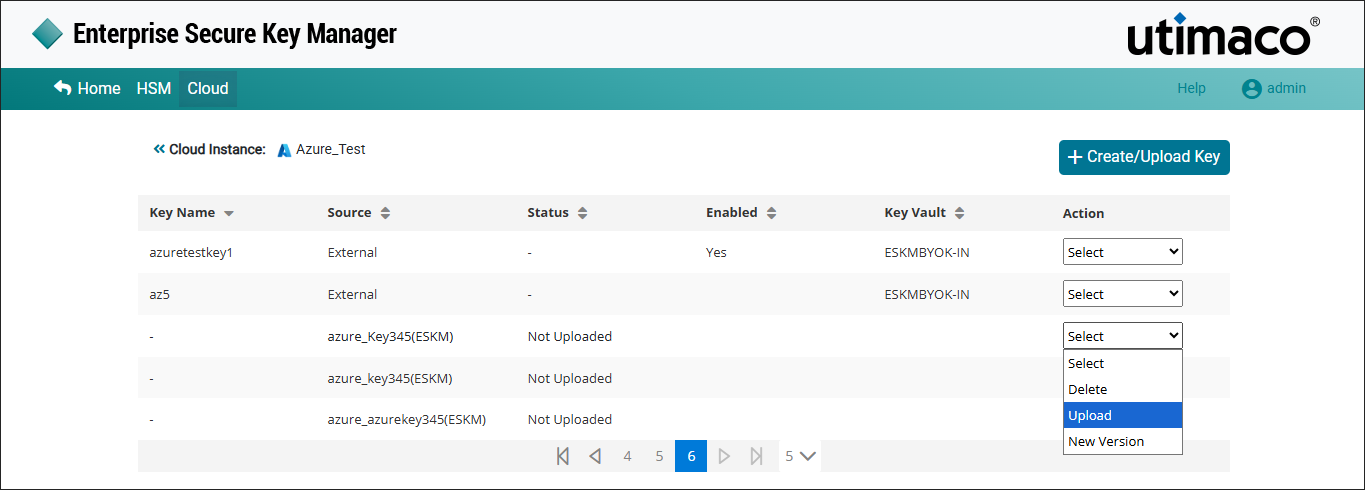
Upload Key
-
Select Upload to upload the new key version to the Azure Cloud console.
For detailed steps, refer Upload Key from ESKM to Azure Cloud.