

This section describes the procedure to add a new cloud instance for Microsoft DKE.
To add new Microsoft DKE Cloud Instance:
-
Click on the “+ Add Cloud Instance” icon at the top right corner of the page.
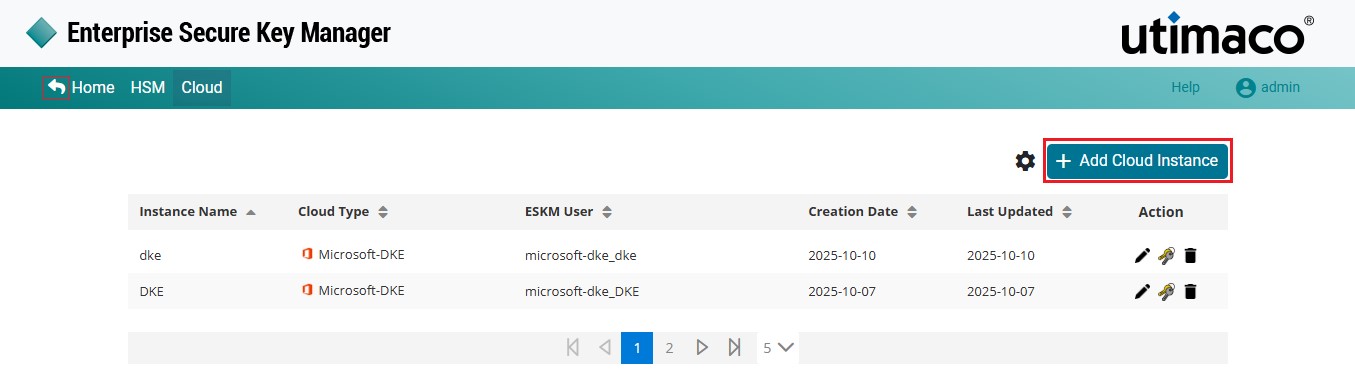
Microsoft DKE Cloud Instance
-
The Add Cloud Instance pop-up window will appear.
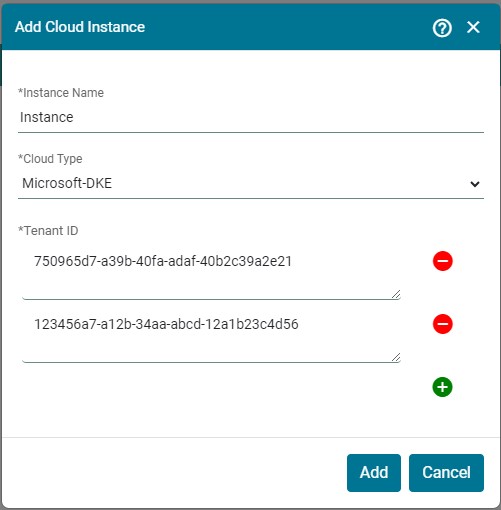
Add Cloud Instance
-
Enter the Instance Name, select Microsoft DKE as the Cloud Type, and then enter the Tenant ID created in Microsoft DKE.
Cloud Instance [Instance Name] Microsoft DKE created successfully.
|
Parameters |
Description |
|---|---|
|
Instance Name |
Name of the Instance |
|
Cloud Type |
The cloud provider with which ESKM is integrated. ere select cloud type as a Microsoft DKE. |
|
Tenant ID |
Tenant ID for the Azure cloud account being used for DKE integration. Search for Tenant Properties in the azure portal to get the tenant ID. You can add multiple tenant IDs to a single Instance. |
Add Microsoft DKE Cloud Instance - parameters