

-
Login to the NDES server using the domain\Administrator.
-
Click start, Open Run and type compmgmt.msc to open Computer Management.
-
Expand Local User and Groups on the Computer Management console tree, under System Tools. Select Groups.
-
Double-click IIS_IUSRS.
-
Click on Add on the IIS_IUSRS Properties window.
-
Enter the NDESAdmin account, select Check Names, and if found then select OK.
-
Select Apply and OK.
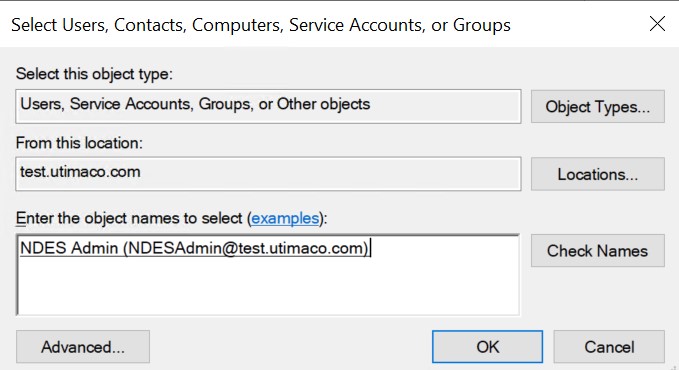
Select Users, Contacts, Computers, Service Accounts, or Groups Window
8. Repeat above steps to add the NDESService account to IIS_IUSRS groups.
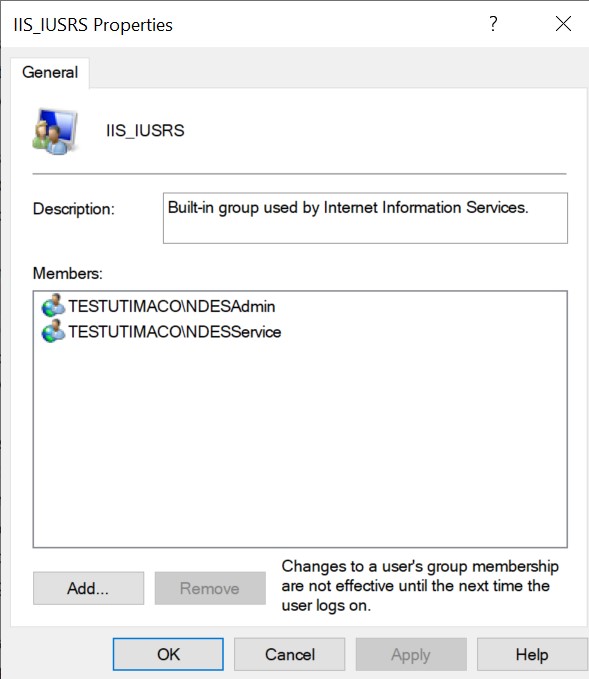
IIS_IUSRS Properties Window