Configuring OpenXPKI to Use Utimaco HSM

  1. Configure crypto.yaml under /etc/openxpki/config.d/realm.tpl with below lines.

crypto.yaml

type:  
 certsign: casigner  
 datasafe: vault  
…………  
token:   
 casigner:  
 backend: OpenXPKI::Crypto::Backend::OpenSSL  
 key: "slot_33-label_Subca"  
 engine: PKCS11  
 engine_section: |  
 engine_id = pkcs11  
 dynamic_path = /usr/lib/x86_64-linux-gnu/engines-3/pkcs11.so  
 MODULE_PATH = /opt/utimaco/lib/libcs_pkcs11_R3.so  
 PIN = __PIN__  
 init = 0  
 engine_usage: 'ALWAYS'  
 key_store: ENGINE  
 shell: /usr/bin/openssl  
 randfile: /var/openxpki/rand  
 wrapper: ''  
 secret: signer  
 vault:  
 backend: OpenXPKI::Crypto::Backend::OpenSSL  
 key: "slot_33-label_Datavault"  
 engine: PKCS11  
 engine_section: |  
 engine_id = pkcs11  
 dynamic_path = /usr/lib/x86_64-linux-gnu/engines-3/pkcs11.so  
 MODULE_PATH = /opt/utimaco/lib/libcs_pkcs11_R3.so  
 PIN = __PIN__  
 init = 0  
 engine_usage: 'ALWAYS'  
 key_store: ENGINE  
 shell: /usr/bin/openssl  
 randfile: /var/openxpki/rand  
 wrapper: ''  
 secret: signer
 secret:  
 signer:  
 label: HSM SLOT PIN  
 method: literal  
 value: 12345678  
 cache: daemon  

Update Slot NO., Key Label and Signer secret value according to your setup. Here Signer secret value is the HSM Slot PIN.

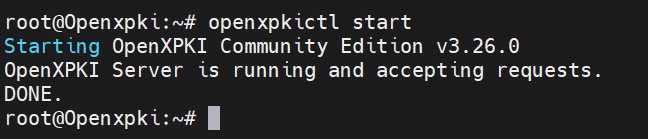
  1. Start openxpki service.

›_ Console

# openxpkictl start 
image-3285581941-1.jpg

Start openxpki service

  1. In the process list, verify that you can see the below two processes running.

›_ Console

#  ps -aux | grep openxpki 
image-3285549154-1.jpg

openxpki process list